Apple iMac 24-inch M4: The Decisive Buying Guide for Busy Workspaces
Deciding whether to modernize your workstation comes down to speed, daily reliability, and minimal setup friction. The Apple iMac 24-inch M4 addresses these demands directly by introducing an updated 8-core M4 processor,…
By Carla Fletcher 9 min read

Apple iMac 24-inch M4
Apple
Very good
4.6 out of 5
Average of the Amazon buyer ratings — not a score from testing of our own
- Specs listed
- 10
- Section
- Computers & Laptops
Check price on Amazon We may earn a commission if you buy through this link.
As Amazon Associates, we earn from qualifying purchases. This means we may receive a small commission at no extra cost to you if you click through and make a purchase.
Deciding whether to modernize your workstation comes down to speed, daily reliability, and minimal setup friction. The Apple iMac 24-inch M4 addresses these demands directly by introducing an updated 8-core M4 processor, a standard baseline of 16GB unified memory, and hardware engineered specifically to run macOS artificial intelligence workloads. For professionals working across demanding browser environments, spreadsheets, creative applications, and video conferencing, this all-in-one system eliminates the clutter of separate computer towers while delivering rapid application responsiveness. Whether you are replacing an aging Intel desktop or considering a jump from an older imac 24 m1, this release establishes a high baseline of out-of-the-box readiness.
This comprehensive imac 24 inch m4 review examines every dimension of the machine to help time-constrained buyers make a swift, practical decision. We explore everyday responsiveness, visual ergonomics on the high-resolution panel, expansion capabilities with external displays, and the trade-offs of the base storage tier. In the following sections, you will find a full component breakdown, a clear specification table, detailed evaluations of core business concerns, and direct comparisons against Windows-based alternatives.



What You Get With the Apple iMac 24-inch M4
Unboxing the system reveals a self-contained desktop designed for instant deployment, requiring only a single power cord to operate while integrating all display, processing, audio, and camera components into a single slim enclosure.
In the box
- Apple iMac 24-inch M4 all-in-one desktop computer with a 21.54 x 5.79 x 18.15 inch footprint and an integrated aluminum stand
- Built-in 24-inch 4.5K Retina display delivering 500 nits of brightness and support for 1 billion colors
- Apple M4 processor configured with an 8-core CPU and an 8-core integrated GPU clocked at 3.2 GHz
- 16GB of unified memory paired with 256GB of onboard solid-state storage
- 12MP Center Stage camera featuring Desk View and 1080p HD video recording capabilities
- Studio-quality three-microphone array alongside a high-fidelity six-speaker sound system with Spatial Audio support
- Thunderbolt 4 expansion ports supporting rapid data transfers and output to up to two external 6K displays
- Built-in wireless networking utilizing Wi-Fi 6E and Bluetooth 5.3 connectivity
- Pre-installed Mac OS with integrated architectural support for Apple Intelligence tools
- Three included lithium-ion batteries required for operating the wireless desktop accessories
Key Specifications
| Processor Model | Apple M4 (8-core CPU, 3.2 GHz clock speed) |
|---|---|
| Graphics Hardware | Apple Integrated Graphics (8-core GPU) |
| Unified Memory | 16GB unified memory (configurable to 24GB) |
| Solid-State Storage | 256GB SSD (configurable to 512GB or 1TB) |
| Display Panel | 24-inch 4.5K Retina display (500 nits, 1 billion colors) |
| Webcam Features | 12MP Center Stage camera with Desk View and 1080p HD recording |
| Audio System | 6-speaker array with Spatial Audio, 3 studio-quality microphones |
| Wireless Standards | Wi-Fi 6E and Bluetooth 5.3 |
| Physical Dimensions | 21.54 x 5.79 x 18.15 inches; 9.72 pounds |
| Model Number | MWUC3LL/A |
All 31 attributes from the listing
| Product Dimensions | 21.54 x 5.79 x 18.15 inches |
|---|---|
| Item Weight | 9.72 pounds |
| Manufacturer | Apple |
| ASIN | B0DL75531G |
| Item model number | MWUC3LL/A |
| Batteries | 3 Lithium Ion batteries required. (included) |
| Date First Available | October 28, 2024 |
| Brand | Apple |
| Operating System | Mac OS |
| CPU Model | Apple M4 |
| CPU Speed | 3.2 GHz |
| Graphics Card Description | Integrated |
| Graphics Coprocessor | Apple Integrated Graphics |
| Memory Storage Capacity | 256 GB |
| Specific Uses For Product | Business, Multimedia, Personal |
| Personal computer design type | All in One |
| Screen Size | 24 inches |
| Chip | Apple M4 chip8-core CPU with 4 performance cores and 4 efficiency cores8-core GPUHardware-accelerated ray tracing16-core Neural Engine120GB/s memory bandwidthMedia EngineHardware-accelerated H.264, HEVC, ProRes, and ProRes RAWVideo decode engineVideo encode engineProRes encode and decode engineAV1 decode |
| *Apple Intelligence** | Apple Intelligence is the personal intelligence system that helps you write, express yourself, and get things done effortlessly. With groundbreaking privacy protections, it gives you peace of mind that no one else can access your data — not even Apple. |
| Storage | 256GB SSDConfigurable to:512GB or 1TB |
| Memory | 16GB unified memoryConfigurable to:24GB unified memory |
| Display | 24-inch 4.5K Retina display4480-by-2520 resolution at 218 pixels per inch with support for 1 billion colors500 nits brightnessWide color (P3)True Tone technology |
| Camera | 12MP Center Stage camera with support for Desk View1080p HD video recordingAdvanced image signal processor with computational video |
| Display Support | Simultaneously supports full native resolution on the built-in display at 1 billion colors and:One external display with up to 6K resolution at 60HzThunderbolt 4 digital video outputNative DisplayPort output over USB‑C |
| Video Playback | Supported formats include HEVC, H.264, AV1, and ProResHDR with Dolby Vision, HDR10+/HDR10, and HLG |
| Audio Playback | Supported formats include AAC, MP3, Apple Lossless, FLAC, Dolby Digital, Dolby Digital Plus, and Dolby Atmos |
| Audio | High-fidelity six-speaker system with force-cancelling woofersWide stereo soundSupport for Spatial Audio when playing music or video with Dolby AtmosStudio-quality three-mic array with high signal-to-noise ratio and directional beamformingSupport for “Hey Siri” or just “Siri” |
| Connections and Expansion | Two Thunderbolt / USB 4 ports with support for:Thunderbolt 4 (up to 40Gb/s)USB 4 (up to 40Gb/s)USB 3.1 Gen 2 (up to 10Gb/s)DisplayPort3.5 mm headphone jack with advanced support for high‑impedance headphonesConfigurable with Gigabit Ethernet |
| Input | Magic KeyboardMagic MouseConfigurable with:Magic Keyboard with Touch ID and Numeric KeypadMagic Trackpad |
| Wireless | Wi-FiWi-Fi 6E (802.11ax)BluetoothBluetooth 5.3 |
| In the Box | iMacMagic KeyboardMagic Mouse143W power adapterPower cord (2 m)USB-C Charge Cable |
Figures as published by the manufacturer on the Amazon listing.
Workplace Productivity and Multitasking Performance
Deploying the imac 24 inch m4 for productivity resolves the memory constraints that previously challenged entry-level business machines. The standard configuration now ships as an apple imac m4 16gb system, doubling the memory allocation found in earlier starting models. Because macOS shares this memory pool dynamically between the 8-core CPU and 8-core GPU, the computer handles heavy workloads without pausing to swap memory to the drive. You can keep dozens of browser tabs active alongside heavy Microsoft 365 spreadsheets, messaging clients, and background cloud syncing tools without observing interface stutter or app reloading.
Evaluating sustained imac 24 inch m4 performance reveals that the 3.2 GHz M4 architecture delivers instantaneous execution for everyday office applications and creative tools alike. Programs within Adobe Creative Cloud launch rapidly, and image-editing workflows complete filters and exports without lagging behind your inputs. For busy professionals who cannot afford delays while toggling between complex client databases and presentation suites, the computational speed ensures uninterrupted workflow momentum throughout demanding business days.
When reviewing the imac 24 inch m4 specs, the primary operational constraint to consider is the base 256GB solid-state drive. While 16GB of unified memory is generous for demanding office multitasking, a 256GB SSD fills quickly if you archive large local databases, offline video presentations, or raw creative media. Workplaces that rely predominantly on cloud enterprise storage will find the base capacity sufficient, but users handling large local files must weigh using external high-speed storage or ordering a factory-upgraded 512GB or 1TB tier.
Retina Display Quality and Video Conferencing Hardware
Working with the imac m4 retina display reveals noticeable clarity that directly benefits long hours of intensive screen work. The 24-inch 4.5K panel operates at 500 nits of brightness and reproduces up to 1 billion colors, rendering text with sharp typography that prevents visual fatigue during extended document review. Graphic artists, marketing coordinators, and presentation designers benefit from predictable color reproduction across web and print formats, giving professionals confidence that their deliverables match standard color profiles.
Virtual collaboration hardware represents another significant upgrade for modern remote and hybrid office environments. The built-in 12MP Center Stage camera utilizes an advanced image signal processor and computational video to frame presenters cleanly during video conferences. Center Stage adjusts dynamically if you shift posture or move around your office, keeping you centered in frame. Furthermore, Desk View enables users to share an overhead view of their physical desk surface while remaining visible on camera, simplifying physical product demonstrations, document walkthroughs, and sketch reviews during live video meetings.
Audio performance matches the visual quality through a studio-grade three-microphone array and a six-speaker sound system supporting Spatial Audio. The directional microphones filter out ambient office noises and keyboard tapping, allowing colleagues to hear your voice clearly without requiring a bulky headset. The multi-speaker sound system outputs clean dialogue and full-range audio, transforming video calls and multimedia presentations into polished experiences. If you want to compare how these acoustic components fit different workplace configurations, you can also review our guide to the apple 2024 imac all-in-one desktop computer.
Peripheral Connectivity and External Display Expansion
Port options on the back panel provide high-speed data transmission through Thunderbolt 4 connections. These ports accommodate fast external solid-state drives, specialized audio interfaces, and hardware docks without slowing down data movement. A notable operational advancement over older entry-tier Apple silicon platforms is the ability to connect up to two external 6K displays alongside the built-in 24-inch screen. This expansion allows financial analysts, software developers, and project managers to build a massive triple-monitor workstation powered entirely by a single compact computer.
Wireless communication is supported by modern Wi-Fi 6E and Bluetooth 5.3 standards. Wi-Fi 6E provides fast throughput on supported office networks, maintaining steady connections during massive file uploads or uninterrupted cloud backups. Bluetooth 5.3 maintains reliable connections to wireless input hardware, headsets, and mobile accessories with minimal power consumption and low latency, ensuring your peripherals respond immediately during fast-paced work sessions.
Physical space efficiency remains a defining asset of this computer. With a depth of just 5.79 inches including the aluminum stand and an overall weight of 9.72 pounds, the system occupies minimal real estate on executive desks, reception counters, and shared collaborative tables. The minimalist layout eliminates cable clutter, presenting an organized workstation to visiting clients. If you are examining older generations to reduce workstation expenditures, consider reading our analysis of the refurbished imac desktop market to balance desk footprint against component longevity.
Apple Intelligence Integration and Workspace Efficiency
Hardware optimization for apple intelligence imac m4 execution enables local processing of writing assistance, text summarization, and streamlined productivity tasks. Designed with hardware-level privacy protections, on-device operations keep sensitive corporate data secure from unauthorized third-party access. Professionals working with sensitive client communications, financial documentation, or proprietary proposals can utilize automated text refinements without compromising corporate privacy standards.
Cross-device synergy between macOS and iOS further optimizes executive time management. Through iPhone Mirroring, you can view and control your smartphone screen directly on the Mac desktop without picking up your handheld device. You can paste clipboard content seamlessly between devices, respond to customer text messages via the desktop keyboard, and answer incoming FaceTime calls directly through the computer audio hardware, keeping your attention focused on your central workspace.
Operating as an imac 24 m4 business desktop, the hardware minimizes downtime through predictable operating system stability and low IT overhead. Standardized deployment tools and dependable software updates make managing these workstations straightforward for technical teams. As an integrated imac 24 inch m4 all in one machine, it offers an exceptionally clean setup that avoids component mismatches or driver conflicts. For a broader overview of the modern desktop hardware landscape, explore our perspective on the imac 2025 desktop computer category.
Apple iMac 24-inch M4 Pros and Cons
Pros
- Apple M4 chip with 8-core CPU and GPU
- 16GB unified memory standard baseline
- Sharp 24-inch 4.5K Retina display
- 12MP Center Stage camera with Desk View
- Dual external 6K display support
- High-speed Thunderbolt 4 connectivity
Cons
- Base internal storage limited to 256GB
- Internal memory not upgradable after purchase
- Fixed 24-inch screen with no larger display size
Check Apple iMac 24-inch M4 on Amazon
Is the Apple iMac 24-inch M4 Worth It
To determine whether an upgrade is imac 24 inch m4 worth it for your business, evaluate your current hardware bottlenecks. If your current office relies on Intel-powered Macs or entry-level desktop machines limited to 8GB of memory, the transition to the M4 architecture offers an immediate, dramatic boost in responsiveness. The inclusion of 16GB of unified memory as standard hardware ensures you will not encounter memory starvation during intensive browser sessions and administrative multitasking.
For creative professionals, marketing executives, legal advisors, and medical offices requiring a clean, client-facing workstation, this desktop represents an outstanding balance of visual quality and everyday speed. The sharp 4.5K Retina panel, intelligent Center Stage webcam, and compact physical footprint deliver a cohesive, premium desktop experience without requiring separate accessory purchases or complex cabling.
The main consideration before buying is matching your storage habits to the 256GB SSD. If your daily operations revolve around cloud applications, email suites, and web platforms, the standard storage tier is entirely adequate. However, if your daily work requires storing local video assets, heavy database backups, or virtual drives, plan on attaching an external Thunderbolt drive or selecting an upgraded internal storage tier at checkout.
Other Options to Consider
| Model | Buyer rating | Ratings | Why it is here |
|---|---|---|---|
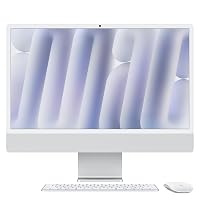 AppleApple 2024 iMac All-in-One Desktop Computer with M4 chip with 8-core CPU…Reviewed here AppleApple 2024 iMac All-in-One Desktop Computer with M4 chip with 8-core CPU…Reviewed here |
4.6Very good | — | The model reviewed on this page. View listing |
 HPHP 24“ OmniStudio All-in-One Desktop Computer, 16GB DDR5 RAM, 640GB Storage HPHP 24“ OmniStudio All-in-One Desktop Computer, 16GB DDR5 RAM, 640GB Storage |
4.4Very good | 148 | 512GB External and 128GB SSD suits users who prefer a Windows 11 operating environment and require higher immediate out-of-the-box storage flexibility, offering a combined 640GB storage configuration across internal and external media along with an Intel Quad-Core processor for routine home and office tasks. View listing |
 HPHP 21.5" FHD All-in-One Desktop Computer, Quad-Cores Intel N100, Windows 11 &… HPHP 21.5" FHD All-in-One Desktop Computer, Quad-Cores Intel N100, Windows 11 &… |
4.5Very good | — | HP 21.5" FHD All-in-One Desktop provides an alternative for compact desks needing a smaller 21.5-inch footprint and an included 8-in-1 docking hub, pairing an Intel N100 processor with 8GB RAM and 384GB storage for budget-oriented basic administrative duties on Windows 11. View listing |
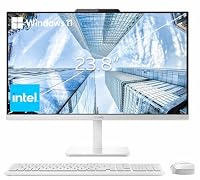 LenovoLenovo 24" FHD All-in-One Desktop Computer for Home & Office, Intel Processor,… LenovoLenovo 24" FHD All-in-One Desktop Computer for Home & Office, Intel Processor,… |
4.2Good | — | Lenovo 24" FHD All-in-One Desktop fits enterprise offices committed to a Windows 11 Pro ecosystem, delivering an Intel processor, 16GB RAM, 256GB PCIe SSD, HDMI connectivity, and wireless accessories in a traditional business desktop package. View listing |
Ratings are the star averages left by Amazon buyers, not scores from our own testing. Prices are the ones on the listing when this page was written.
FAQ
Can the Apple iMac 24-inch M4 support multiple external displays?
Yes, the M4 architecture allows connection to up to two external 6K displays while simultaneously utilizing the integrated 24-inch 4.5K Retina screen, expanding available desktop workspace for complex multitasking.
Is the 16GB unified memory upgradeable after purchase?
No, the unified memory is integrated directly into the Apple M4 processor package. You must select either the standard 16GB or the optional 24GB memory configuration at the time of purchase.
What does the 12MP Center Stage camera do during video calls?
The 12MP Center Stage camera uses computational video processing to automatically track your movement, keeping you centered in the frame. It also supports Desk View, allowing you to present physical items on your desktop surface while on camera.
Does this desktop come with the required batteries?
Yes, the product listing confirms that three lithium-ion batteries are included in the package to power the wireless accessories right out of the box.
Is the 256GB internal storage adequate for business use?
The 256GB solid-state drive is sufficient for cloud-based office workflows, web applications, and standard documents. However, users managing large local media archives or video projects will benefit from using an external Thunderbolt drive or ordering a larger factory storage capacity.
More Computers & Laptops ratings
See the section
Apple MacBook Pro 14 (M5 Pro): A Decisive Performance Review for Working Professionals
Knowledge workers, software developers, and content creators evaluating the Apple MacBook Pro 14 M5 Pro are primarily asking whether the new platform provides enough…
Dell Inspiron 15 3530 Laptop: The Executive Buying Guide
Navigating modern corporate computing demands a device that balances processing efficiency, system security, and reliable peripheral integration. The Dell Inspiron 15 3530 targets remote…

Should You Buy the Lenovo ThinkPad X1 Yoga Gen 4 for Work?
Evaluating convertible business notebooks requires balancing typing ergonomics, presentation flexibility, and processing stability. The Lenovo ThinkPad X1 Yoga Gen 4 addresses this balance by…

Dell Inspiron 15 Touchscreen Review: Reliable Multitasking for Professionals
Professionals managing dense office workflows require dependable computing hardware that sustains responsive performance across multiple browser sessions, extensive spreadsheets, and communication apps. The Dell…

HP Pavilion Desktop: A Practical Review for Busy Workspaces
Desk space in modern offices is valuable, and finding a computer that handles enterprise multitasking without cluttering your workstation can prove challenging. The HP…
Get new ratings by email
A weekly digest of the products added to the ratings pages.