Dell Inspiron 15 3530 Laptop: The Executive Buying Guide
Navigating modern corporate computing demands a device that balances processing efficiency, system security, and reliable peripheral integration. The Dell Inspiron 15 3530 targets remote professionals, corporate specialists, and enterprise telecommuters who require…
By Carla Fletcher 11 min read

Dell Inspiron 15 3530
Dell
Very good
4.5 out of 5
Average of 32 Amazon buyer ratings — not a score from testing of our own
- Ratings counted
- 32
- Specs listed
- 10
- Section
- Computers & Laptops
Check price on Amazon We may earn a commission if you buy through this link.
How buyers rated it
Share of 32 Amazon ratings.
As Amazon Associates, we earn from qualifying purchases. This means we may receive a small commission at no extra cost to you if you click through and make a purchase.
Navigating modern corporate computing demands a device that balances processing efficiency, system security, and reliable peripheral integration. The Dell Inspiron 15 3530 targets remote professionals, corporate specialists, and enterprise telecommuters who require consistent execution across heavy office multitasking, extensive spreadsheet operations, and virtual conferencing. Configured with a 13th Generation Intel Core i7-1355U processor, 16GB of high-bandwidth memory, and a 1TB solid-state drive, this laptop directly solves the typical performance bottlenecks encountered in entry-tier corporate systems. If you need a straightforward, business-ready workstation that deploys right out of the box with advanced administrative controls, this machine offers a direct, highly practical answer.
Selecting an effective enterprise portable computer requires assessing practical workflow demands, physical interface options, thermal handling, and mobility parameters. In this executive review, we examine the Dell Inspiron 15 3530 specs across continuous office operations, evaluate the multitasking bandwidth provided by its hybrid ten-core processor, review the functional utility of its touch-enabled display, and outline its internal upgrade paths. We also analyze trade-offs concerning battery volume and interface standards so you can make an informed, decisive procurement choice for your business setup.


What You Get With the Dell Inspiron 15 3530
The Dell Inspiron 15 3530 arrives configured with hardware tailored toward business productivity, cloud collaboration, and administrative fleet deployment straight out of the packaging.
In the box
- 13th Generation Intel Core i7-1355U processor with 10 cores, 12 threads, 12MB cache, and boost speeds up to 5.0 GHz
- 16GB of high-bandwidth DDR4 SDRAM for uninterrupted multi-application workflows
- 1TB PCIe NVMe M.2 solid-state drive delivering rapid boot cycles and enterprise file transfers
- 15.6-inch Full HD (1920 x 1080) anti-glare WVA touchscreen with narrow borders
- Integrated Intel Iris Xe Graphics coprocessor
- Windows 11 Pro operating system with native domain join, BitLocker, and group policy management
- Widescreen FHD 1080p webcam paired with integrated stereo speakers
- Wi-Fi 6 (2×2/160) Gig+ and Bluetooth combo wireless adapter
- Complete port selection including USB-C 3.2 Gen 1, USB-A 3.2 Gen 1, USB-A 2.0, HDMI 1.4, and an SD card reader
- 3-cell 41 WHr integrated battery and dedicated AC charging adapter
Key Specifications
| Processor | Intel Core i7-1355U (10 Cores, 12 Threads, Base 1.20 GHz, Max Turbo 5.0 GHz, 12MB Cache) |
|---|---|
| Installed Memory | 16GB DDR4 SDRAM (Platform supports up to 64GB) |
| Primary Storage | 1TB PCIe NVMe M.2 Solid State Drive (Supports up to 2TB SSD + 2TB HDD) |
| Display Panel | 15.6" FHD (1920 x 1080) Anti-glare LED Backlight Narrow Border WVA Touchscreen |
| Graphics Architecture | Intel Iris Xe Graphics (Integrated) |
| Operating System | Windows 11 Pro (Includes Azure AD, BitLocker, Assigned Access) |
| Webcam Resolution | 1080p FHD Integrated Widescreen Webcam |
| Wireless Connectivity | Wi-Fi 6 (2×2/160) Gig+ and Bluetooth Combo |
| Chassis Dimensions | 14.11" L x 9.25" W x 0.75" Thickness |
| System Weight | 3.64 Pounds (Carbon Black Finish) |
All 89 attributes from the listing
| Color | Black |
|---|---|
| Hard-Drive Size | 1 TB |
| Operating System | Windows 11 Pro |
| Graphics Description | Integrated |
| Graphics Coprocessor | Intel Core Iris Xe Graphics |
| Hard Disk Description | SSD |
| Item Weight | 3.6 pounds |
| Video Processor | Intel |
| Graphics Card Ram | 4 GB |
| Automatic Backup Software Included | Webcam |
| Form Factor | Laptop |
| Hard Disk Interface | PCIE x 4 |
| Camera Description | 1080P HD Webcam |
| Graphics Ram Type | DDR4 SDRAM |
| Compatible Devices | Laptop, USB storage devices, Wi-Fi enabled devices, HDMI monitors, Bluetooth peripherals |
| Warranty Type | Limited |
| Item Dimensions L x W x Thickness | 14.11"L x 9.25"W x 0.75"Th |
| Power Device | AC adapter |
| Video Output | HDMI |
| Operating System Family | Windows |
| Number of Drivers | 1 |
| Screen Size | 15.6 inches |
| Resolution | 1080p |
| Native Resolution | 1920 x 1080 pixels |
| Display Type | LCD |
| Display Resolution Maximum | 1920×1080 pixels |
| Display Technology | LED |
| Display Refresh Rate in Hertz | 60 |
| Supported Monitor Maximum Quantity | 1 |
| Touch Screen Type | capacitive |
| Screen Finish | Glossy |
| Display Maximum Resolution | 1920 x 1080 |
| Connectivity Technology | Bluetooth, HDMI, USB, Wi-Fi |
| Wireless Technology | Wi-Fi |
| Wireless Compability | 5 GHz Radio Frequency, Bluetooth |
| Bluetooth Version | 5 |
| Wi-Fi Generation | Wi-Fi 6 |
| Human-Interface Input | Keyboard, Touchscreen |
| Keyboard Description | US |
| Notebook Pointing Device Description | [Partial] Touchscreen |
| Keyboard Layout | QWERTY |
| Control Method | Touch |
| Touchpad Feature | True |
| Processor Series | Core i7 Family |
| Processor Speed | 1.2 GHz |
| Processor Count | 10 |
| Processor Brand | Intel |
| CPU Model Number | i7-1355U |
| CPU Model Generation | 13 |
| CPU Model Speed Maximum | 5000 GHz |
| CPU Codename | Raptor Lake |
| Brand | Dell |
| Model Name | nspiron 15 3530 |
| Model Year | 2023 |
| Model Number | Inspiron 15 3530 |
| Built-In Media | Webcam, Stereo speakers, HDMI port |
| Manufacturer | Dell, Inc. |
| Series Number | 35 |
| UPC | 884116514794 |
| Number of Items | 1 |
| Model Series | Inspiron |
| Best Sellers Rank | #894 in Computers & Accessories (See Top 100 in Computers & Accessories) #69 in Traditional Laptop Computers |
| ASIN | B0CB6XKK9Y |
| Customer Reviews | 4.5 4.5 out of 5 stars (32) 4.5 out of 5 stars |
| RAM Memory Installed | 16 GB |
| RAM Memory Technology | DDR4 |
| Memory Clock Speed | 2400 MHz |
| Ram Memory Maximum Size | 16 GB |
| RAM Type | DDR4 SDRAM |
| RAM Memory Slot Total Count | 2 |
| RAM Size | 16 GB |
| Memory Storage Capacity | 1 TB |
| Compatible Flash Memory Type | SD |
| Memory Slots Available | 2 |
| Battery Cell Type | Lithium Ion |
| Lithium-Battery Energy Content | 41 watt-hours |
| Total Usb Ports | 3 |
| Hardware Interface | USB 3.1 Type C |
| Number of Ports | 4 |
| Total Number of HDMI Ports | 1 |
| Available M2 Slot Count | 1 |
| Audio Output Type | Headphones, Speakers |
| Speaker Description | Integrated stereo speakers |
| Microphone Form Factor | Integrated microphone |
| Audio features | This product includes stereo speakers |
| Hard Disk Size | 1 TB |
| CPU Model | Core i7 Family |
| Ram Memory Installed Size | 16 GB |
| Graphics Card Description | Integrated |
Figures as published by the manufacturer on the Amazon listing.
Everyday Multitasking and Processing Power
The operational core of this machine relies on the 13th Generation Intel Core i7-1355U, an architecture configured with two performance cores dedicated to intensive compute bursts alongside eight efficiency cores engineered to sustain continuous background processes. Operating across twelve threads with 12MB of Intel Smart Cache and a ceiling turbo velocity reaching 5.0 GHz, the dell inspiron 15 3530 performance profile provides smooth throughput during intense administrative tasks. When handling simultaneous enterprise demands—such as calculating nested formulas across complex financial spreadsheets, compiling presentation decks, and running active video calls—the processor orchestrates workloads cleanly without the micro-stutters common in lower-tier silicon. For broader office workflows, standard models in the dell inspiron 15 series demonstrate how Dell balances thermal dissipation and chassis volume for everyday workplace reliability.
Memory throughput directly determines how comfortably a professional can operate without system stalls. With 16GB of high-bandwidth RAM working alongside a fast 1TB PCIe NVMe solid-state drive, this system eliminates typical data loading delays. Booting Windows, launching resource-heavy CRM suites, and managing dozens of active web browser tabs occur with negligible latency. The storage subsystem utilizes the PCIe x4 interface, ensuring high-speed local data manipulation when shifting expansive customer databases or local media archives. For growing organizations planning long-term deployment, the platform architecture accommodates a dell inspiron 15 3530 ram upgrade up to 64GB DDR4, alongside expansion capabilities supporting secondary storage configurations up to a 2TB SSD and 2TB mechanical drive according to the system specifications.
Graphics rendering is handled by the integrated Intel Iris Xe Graphics platform. While dedicated workstation graphics cards are reserved for heavy three-dimensional engineering modeling or continuous video rendering, Iris Xe easily powers standard enterprise visual demands. It drives external high-resolution panels, executes hardware-accelerated video decoding, and provides smooth rendering during digital webinars and design presentations. For professionals focused strictly on corporate execution, cloud computing, remote desktop administration, and office productivity, the computing envelope delivers reliable power without generating extreme thermal throttle events during standard business hours.
Port Selection and Office Connectivity
Physical interface flexibility remains a vital consideration for office stations, docking stations, and field meetings. The Dell Inspiron 15 3530 incorporates a functional selection of ports across its side panels, including one USB-C 3.2 Gen 1 port, one USB-A 3.2 Gen 1 port, an older legacy USB-A 2.0 port, an HDMI 1.4 output, a dedicated SD card reader, a 3.5mm combo headphone/microphone audio jack, and a dedicated barrel power connector. Having both USB-C and standard USB-A connections allows you to interface modern flash arrays alongside established office peripherals like legacy wireless mouse transceivers or external keyboards without relying heavily on adapter dongles. Those evaluating dedicated corporate desk environments can compare these options against commercial-grade devices like the dell 7440 laptop to weigh interface standards against specialized enterprise dock ecosystems.
Remote teleconferencing performance represents another strong aspect of this configuration. Dell integrates a 1080p Full HD widescreen webcam directly into the top display bezel, paired with built-in stereo speakers. Standard commercial portables often cut corners by incorporating low-grade 720p sensors that produce grainy video in dim home offices. The 1080p sensor on this machine outputs sharp, balanced video frames during professional client meetings, executive board calls, and virtual training seminars. Combined with high-speed Wi-Fi 6 (2×2/160) Gig+ wireless connectivity and modern Bluetooth integration, the laptop maintains solid wireless transfer rates and uninterrupted packet delivery over modern office routers even in crowded corporate RF environments.
It is important to note certain technical boundaries within the port array. The external monitor connection utilizes HDMI 1.4, an established standard perfectly suited for standard Full HD office displays at 60Hz, but one that limits refresh rates if you plan to attach high-refresh 4K monitors directly through that port. Furthermore, the inclusion of a USB-A 2.0 port provides convenient access for standard input devices such as mice or printers, though high-speed external data drives should be reserved exclusively for the USB 3.2 Gen 1 ports to prevent bandwidth bottlenecks. The integrated multi-format SD card reader remains a valuable addition for office personnel handling photography, media uploads, or direct document storage from external flash media.
Display Usability and Touchscreen Performance
Visual interaction on this laptop is built around a 15.6-inch Full HD WVA panel operating at a native 1920 x 1080 resolution. A key attribute highlighted in any comprehensive dell inspiron 15 3530 touchscreen review is the inclusion of an anti-glare coating over a capacitive touch-enabled surface. Touchscreens frequently feature glossy outer glass that reflects harsh office lighting or sunlight from nearby windows, inducing eye strain across extended working hours. Dell counters this challenge by pairing anti-glare LED backlighting with wide viewing angle (WVA) technology, maintaining color consistency and text clarity even when viewing the screen off-center during collaborative team reviews.
The touch interface adds natural physical utility to daily office administration. While it maintains a conventional clamshell format rather than folding into a dedicated tablet like the dell inspiron 14 2 in 1, having responsive multi-touch capability directly on a 15.6-inch workstation panel provides notable ergonomic benefits. Executives and analysts can quickly swipe through lengthy PDF audit reports, pinch to examine financial chart details, tap through web interfaces, or mark up digital drafts during live discussions. The narrow border bezel design maximizes active visual real estate, giving the laptop a clean, modern aesthetic that fits neatly in executive boardrooms and client-facing presentation settings.
Full HD resolution across a 15.6-inch diagonal yields a sharp pixel density that renders text documents, dense spreadsheets, and data dashboards crisply without requiring awkward display scaling settings. Operating system controls inside Windows 11 respond promptly to fingertip inputs, making navigating system toggles and application windows straightforward. While creative professionals requiring specialized wide-gamut color spaces for print production might explore dedicated design panels, this display delivers dependable contrast, readable typography, and versatile interaction for standard corporate workflows.
Battery Life and Mobility Limits
Mobile capability is defined by a balance between chassis mass, thermal design, and power storage capacity. The Dell Inspiron 15 3530 features a clean Carbon Black chassis measuring 14.11 inches long, 9.25 inches wide, and 0.75 inches thick, with a total weight of 3.64 pounds. For a full-sized 15.6-inch notebook housing a ten-core processor, this weight class remains comfortably portable. It slides easily into executive briefcases or commuter backpacks, making movement between corporate campuses, home offices, and regional client sites practical and physically manageable.
When evaluating portable runtimes, dell inspiron 15 3530 battery life expectations must be framed around its internal hardware specifications. Power is supplied by an integrated 3-cell 41 WHr battery. Given that the system drives a vibrant 15.6-inch touch-sensitive panel alongside an Intel Core i7 processor capable of dynamic 5.0 GHz turbo boosts, a 41 WHr battery provides adequate power for standard meetings, transit sessions, and coffee shop working blocks, but will require the AC adapter during full eight-hour workdays. Continuous multitasking, maximum screen brightness, and ongoing video conferencing will draw down a 41 WHr reserve steadily.
For mobile professionals who spend long hours away from wall outlets, managing power profiles through Windows 11 Pro becomes a practical necessity. Adjusting display brightness, leveraging the efficiency cores of the i7-1355U, and shutting down background processes can stretch operational endurance when traveling. However, this laptop functions best as a semi-portable office station that moves effortlessly between desks and conference rooms rather than an ultra-mobile, multi-day field machine. Bringing the included AC adapter along on business travel ensures you maintain peak processing power whenever intensive data manipulation is required.
Dell Inspiron 15 3530 Pros and Cons
Pros
- Responsive 10-core Intel Core i7-1355U processor
- Generous 16GB RAM and 1TB NVMe SSD
- Pre-installed Windows 11 Pro business tools
- Sharp 1080p FHD webcam for conferencing
- Anti-glare Full HD WVA touchscreen
Cons
- Modest 41 WHr battery capacity
- Video output limited to HDMI 1.4
- Includes legacy USB-A 2.0 port
Check Dell Inspiron 15 3530 on Amazon
Is the Dell Inspiron 15 3530 Worth It
Determining whether the Dell Inspiron 15 3530 represents a wise investment depends on your operational priorities and the software ecosystem your business relies on daily. If you are an executive, corporate manager, financial analyst, or administrative specialist seeking an agile, pre-configured workstation, this laptop delivers exceptional utility. The combination of a 10-core Core i7-1355U, 16GB of DDR4 memory, and a 1TB NVMe drive ensures that everyday office multitasking, massive data sorting, and high-definition video collaboration run without disruption.
The operating system inclusion represents another substantial asset for enterprise buyers. The dell inspiron 15 3530 windows 11 pro environment provides crucial business management tools immediately upon initial boot. Corporate IT departments benefit from out-of-the-box support for Azure Active Directory, dynamic provisioning, Assigned Access, Group Policy controls, and BitLocker data encryption. These features eliminate the need for aftermarket operating system upgrades, reducing deployment friction and ensuring compliance with modern enterprise security standards from day one.
Conversely, this laptop is less suitable for users whose primary workload centers on heavy three-dimensional CAD rendering, advanced video timeline editing, or extended off-grid field operations where access to AC power is unavailable. The integrated Intel Iris Xe graphics and 41 WHr battery are intentionally engineered for commercial office efficiency rather than continuous creative production or marathon travel endurance. For buyers prioritizing office responsiveness, touch convenience, rapid enterprise storage, and administrative deployment, the machine provides balanced, reliable capability.
Other Options to Consider
| Model | Buyer rating | Ratings | Why it is here |
|---|---|---|---|
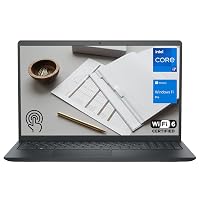 DellDELL 13th Generation Business Inspiron 15 3530 Laptop, 15.6" FHD Touchscreen, Intel…Reviewed here DellDELL 13th Generation Business Inspiron 15 3530 Laptop, 15.6" FHD Touchscreen, Intel…Reviewed here |
4.5Very good | 32 | The model reviewed on this page. View listing |
 HPHP 14 Laptop, 2027 Edition, 4GB RAM, 128GB SSD, Intel N150 CPU HPHP 14 Laptop, 2027 Edition, 4GB RAM, 128GB SSD, Intel N150 CPU |
2.5Poor | 10 | 2026-2027 edition HP 14 Laptop Computer suits professionals who require basic cloud-based document drafting in a more compact 14-inch footprint, utilizing an Intel N150 processor, 4GB of DDR5 RAM, 128GB of SSD storage, and bundled Microsoft 365 with 1TB cloud storage rather than the heavy multi-threaded processing power of the Dell. View listing |
 Padix15.6 Inch Laptop Computer, N4020, 4GB DDR4 RAM, 128GB eMMC,with Windows 11 Padix15.6 Inch Laptop Computer, N4020, 4GB DDR4 RAM, 128GB eMMC,with Windows 11 |
4.1Good | — | Supports 1TB TF Card Expansion 15.6 Inch Laptop Computer is tailored for entry-level home office operators or students who prioritize expandable card storage and basic web navigation via an Intel N4020 processor, 4GB of DDR4 RAM, and 128GB eMMC storage instead of enterprise-grade security and Core i7 processing. View listing |
 HPHP 2026 Essential Laptop, Intel Processor, 128GB Storage, Windows 11 HPHP 2026 Essential Laptop, Intel Processor, 128GB Storage, Windows 11 |
4.3Good | — | Copilot AI Natural Silver HP 2026 Essential Laptop offers a lightweight design with dedicated Copilot AI software integration, Office 365, an LED display, and 128GB storage, making it preferable for light-duty users focused on assisted typing and cloud productivity rather than demanding local business databases. View listing |
Ratings are the star averages left by Amazon buyers, not scores from our own testing. Prices are the ones on the listing when this page was written.
FAQ
Can the Dell Inspiron 15 3530 RAM be upgraded?
Yes, according to the manufacturer specifications, the system memory architecture supports up to 64GB of DDR4 SDRAM. This allows business users and IT teams to expand beyond the factory-installed 16GB configuration as organizational software demands and multitasking requirements grow over time.
What enterprise capabilities does Windows 11 Pro provide on this laptop?
The pre-installed Windows 11 Pro operating system delivers business-grade administrative features including Mobile Device Management, Group Policy controls, Azure Active Directory / Active Directory integration, BitLocker drive encryption, Enterprise State Roaming, Dynamic Provisioning, Kiosk mode, and Windows Update for Business.
Is the Dell Inspiron 15 3530 touchscreen responsive for daily office work?
The 15.6-inch Full HD display features responsive capacitive touch input combined with an anti-glare coating and wide viewing angles (WVA). It allows users to quickly scroll through large spreadsheets, navigate web interfaces, sign digital documents, and present slides directly with their fingertips while minimizing reflections in brightly lit office spaces.
What is the battery capacity of the Dell Inspiron 15 3530?
The laptop is equipped with an integrated 3-cell 41 WHr battery. While compact and lightweight, this capacity is designed primarily for moving between conference rooms, meetings, and short off-desk intervals; keeping the included AC adapter accessible during prolonged high-demand working sessions is recommended.
Does this laptop feature a high-resolution webcam for video conferencing?
Yes, the Dell Inspiron 15 3530 features an integrated widescreen FHD 1080p webcam paired with built-in stereo speakers. This provides significantly clearer and crisper video output during virtual meetings and remote webinars compared to the lower-resolution 720p webcams found in standard entry-tier laptops.
More Computers & Laptops ratings
See the section
Apple MacBook Pro 14 (M5 Pro): A Decisive Performance Review for Working Professionals
Knowledge workers, software developers, and content creators evaluating the Apple MacBook Pro 14 M5 Pro are primarily asking whether the new platform provides enough…

Should You Buy the Lenovo ThinkPad X1 Yoga Gen 4 for Work?
Evaluating convertible business notebooks requires balancing typing ergonomics, presentation flexibility, and processing stability. The Lenovo ThinkPad X1 Yoga Gen 4 addresses this balance by…
Apple iMac 24-inch M4: The Decisive Buying Guide for Busy Workspaces
Deciding whether to modernize your workstation comes down to speed, daily reliability, and minimal setup friction. The Apple iMac 24-inch M4 addresses these demands…

Dell Inspiron 15 Touchscreen Review: Reliable Multitasking for Professionals
Professionals managing dense office workflows require dependable computing hardware that sustains responsive performance across multiple browser sessions, extensive spreadsheets, and communication apps. The Dell…

HP Pavilion Desktop: A Practical Review for Busy Workspaces
Desk space in modern offices is valuable, and finding a computer that handles enterprise multitasking without cluttering your workstation can prove challenging. The HP…
Get new ratings by email
A weekly digest of the products added to the ratings pages.