Alienware AW2725DF: Is 360Hz QD-OLED the Definitive Pick?
For competitive players and dedicated enthusiasts who prioritize reaction speed alongside pristine image fidelity, the Alienware AW2725DF answers the call for a no-compromise gaming display. Built around a 26.7-inch Quantum-Dot OLED panel…
By Zachary Chapman 9 min read
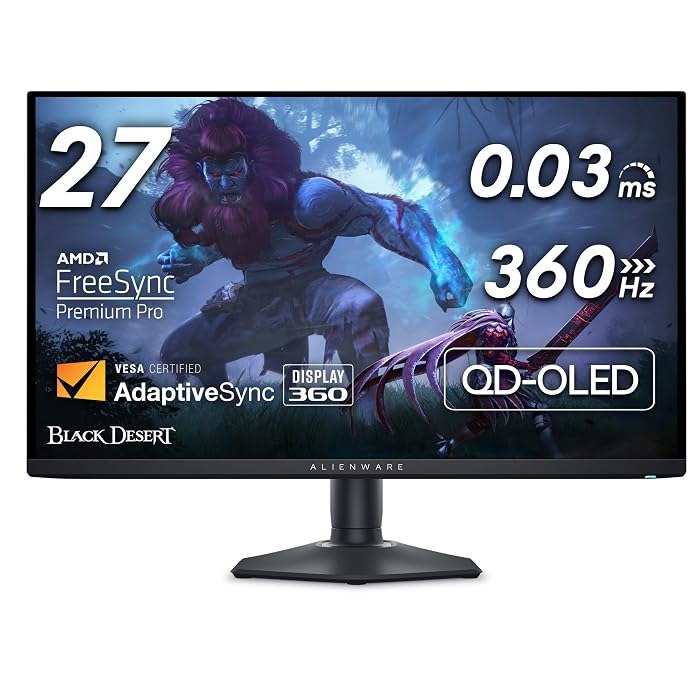
Alienware AW2725DF
Alienware
Very good
4.4 out of 5
Average of 425 Amazon buyer ratings — not a score from testing of our own
- Ratings counted
- 425
- Specs listed
- 10
- Section
- Monitors
Check price on Amazon We may earn a commission if you buy through this link.
How buyers rated it
Share of 425 Amazon ratings.
As Amazon Associates, we earn from qualifying purchases. This means we may receive a small commission at no extra cost to you if you click through and make a purchase.
For competitive players and dedicated enthusiasts who prioritize reaction speed alongside pristine image fidelity, the Alienware AW2725DF answers the call for a no-compromise gaming display. Built around a 26.7-inch Quantum-Dot OLED panel operating at a native 2560×1440 resolution with a 360Hz refresh rate, this screen addresses the long-standing divide between high-speed esports monitors and visually rich creative monitors. If your goal is to achieve lightning-fast target acquisition without tolerating washed-out colors or sluggish pixel transitions, this monitor delivers the specialized technical framework necessary to elevate modern competitive play.
In this dell alienware aw2725df review, we systematically evaluate how the display behaves across real-world workloads, from fast-paced multiplayer arenas to color-critical tasks. We inspect the dell alienware aw2725df specs, explore how its physical adjustments and connectivity fit into modern workspaces, discuss practical performance trade-offs, and compare competing alternatives to establish whether this premium hardware investment aligns with your specific desk requirements.




What You Get With the Alienware AW2725DF
Unboxing the Alienware AW2725DF reveals a competitive gaming hardware package built around advanced panel technology, versatile ergonomics, and dedicated gamer-centric utilities detailed in the manufacturer specifications:
In the box
- Alienware AW2725DF 26.7-inch Quantom-Dot WQHD (2560×1440) OLED display panel with matte screen finish.
- Ergonomic monitor stand providing height, tilt, swivel, and pivot adjustability.
- Space-saving minimal hexagonal desktop base designed to optimize mousepad placement.
- Display connectivity featuring HDMI and DisplayPort (DP) interfaces alongside high-speed USB 3.2 Gen1 ports.
- 3-zone AlienFX lighting integrated into the rear chassis for customizable setup aesthetics.
- Onboard AlienVision hardware overlays providing configurable visual tools directly from the display firmware.
- Three-year Advanced Exchange Service warranty providing dedicated long-term hardware support.
Key Specifications
| Display Size & Technology | 26.7 inches (listed as 27 inches), Quantum-Dot OLED (QD-OLED) |
|---|---|
| Native Screen Resolution | 2560 x 1440 (QHD Wide 1440p) |
| Refresh Rate | 360 hertz |
| Response Time | 0.03 ms gray-to-gray minimum |
| Contrast Ratio | 1.5 million:1 (at SDR and HDR) / Infinite contrast ratio |
| Color Accuracy & Coverage | DCI-P3 99.3% color coverage, Delta E<2 accuracy |
| HDR Standard & Brightness | VESA DisplayHDR True Black 400, 1000 brightness rating |
| Adaptive Sync Compatibility | AMD FreeSync Premium Pro, VESA AdaptiveSync |
| Screen Surface & Viewing Angles | Matte finish, 178 degrees viewing angle |
| Chassis Dimensions & Weight | 9.59"D x 23.98"W x 15.99"H; 13.9 pounds |
All 44 attributes from the listing
| Aspect Ratio | 16:10 |
|---|---|
| Screen Finish | Matte |
| Contrast Ratio | 1.5 million:1 (at SDR and HDR) |
| Refresh Rate | 360 hertz |
| Display Type | OLED |
| Display Technology | OLED |
| Viewing Angle | 178 degrees |
| Brightness | 1000 |
| Pixel Pitch | 111 |
| Picture Quality Enhancement Technology | QD-OLED, DCI-P3 99.3% color coverage, Delta E<2 accuracy, VESA DisplayHDR True Black 400 |
| Screen Size | 27 inches |
| Item Dimensions D x W x H | 9.59"D x 23.98"W x 15.99"H |
| Item Weight | 13.9 pounds |
| Resolution | QHD Wide 1440p |
| Display Resolution Maximum | 2560 x 1440 |
| Native Resolution | 2560×1440 |
| Power Consumption | 27.6 watts |
| Voltage | 240 volts of alternating current |
| Connectivity Technology | DisplayPort, HDMI, USB 3.2 Gen1 |
| Hardware Connectivity | Bluetooth, DisplayPort, Ethernet, HDMI, Solid State Drive, Thunderbolt 4, USB |
| Adaptive Sync | FreeSync |
| Additional Features | Anti Glare Screen, Flicker-Free, Height Adjustment, Pivot Adjustment, Swivel Adjustment, Tilt Adjustment |
| Specific Uses For Product | Desktop, Gaming, Photo Video Editing |
| Color | Black |
| Mounting Type | Desk Mount |
| Warranty Type | 3 Years Warranty |
| Shape | rectangular prism |
| Brand | Alienware |
| Model Number | AW2725DF |
| Model Name | Alienware 27 360Hz QD-OLED Gaming Monitor – AW2725DF |
| Warranty Description | 3-Year Advanced Exchange Service and Premium Panel Exchange (Including coverage for OLED burn in) |
| UPC | 884116463283 |
| Manufacturer | Dell |
| Unit Count | 1 Count |
| Included Components | 1 x DisplayPort to DisplayPort 1.4 cable (1.80 meters),, 1 x USB 3.2 Gen1(5 Gbps) upstream cable (1.80 meters), 1 x USB-C to DisplayPort 1.4 cable (1.0 meters), Factory calibration report, Alienware Sticker, HDMI cable, I/O cover, Microfiber Cloth, Monitor, Power cable, Quick start guide, Safety/Environmental/Regulatory Information, Stand riser and base |
| Best Sellers Rank | #2,140 in Electronics (See Top 100 in Electronics) #77 in Computer Monitors |
| ASIN | B0CZSGWLD5 |
| Customer Reviews | 4.4 4.4 out of 5 stars (425) 4.4 out of 5 stars |
| Response Time | 0.03 milliseconds |
| Total Number of HDMI Ports | 1 |
| Total Usb Ports | 5 |
| Number of Component Outputs | 3 |
| Total USB 3.0 Ports | 5 |
| Screen Surface Description | Matte |
Figures as published by the manufacturer on the Amazon listing.
Motion Clarity and Competitive Frame Pacing
The defining characteristic of the alienware aw2725df 360hz qd-oled configuration is how it handles rapid in-game movement. Traditional fast LCD panels often rely on aggressive overdrive modes to achieve fast refresh rates, which frequently leads to noticeable inverse ghosting, overshoot coronas, or smearing behind moving targets. The Alienware AW2725DF bypasses these mechanical liquid-crystal limitations by employing self-emissive organic pixels. With a manufacturer-rated alienware aw2725df response time of 0.03 ms gray-to-gray minimum, pixel color transitions occur almost instantaneously. This sub-millisecond shift ensures that rapid sweeps across crowded battlefields remain sharp and legible without visible trailing.
Combining that rapid pixel transition with a native 360Hz refresh rate yields an exceptional level of motion clarity. At 360 frames per second, the display draws a new frame every 2.77 milliseconds, providing competitive players with near-instantaneous visual updates. Fast mouse movements, sudden crosshair adjustments, and fleeting character outlines retain their sharpness even during intense firefights. For esports enthusiasts driving high frame rates using powerful desktop rigs like the dell alienware 16 aurora, this monitor ensures every frame rendered by the graphics processor translates directly onto the screen without perceptual lag.
Synchronization stability is handled by built-in AMD FreeSync Premium Pro alongside certified VESA AdaptiveSync. Variable refresh rate technology synchronizes the panel refresh cycle directly to the graphics card output, eliminating screen tearing, micro-stutters, and visual judder during unexpected frame drops. Even when demanding gameplay scenarios cause frame rates to fluctuate below the 360Hz ceiling, the visual delivery remains smooth and cohesive, preserving competitive tracking fidelity without requiring jarring software-based vertical sync solutions.
Color Accuracy and QD-OLED Panel Architecture
While speed is paramount for esports, the alienware aw2725df display quality excels equally in visual precision due to its Quantum Dot OLED architecture. Unlike conventional displays that use a passive backlight filtered through liquid crystals, QD-OLED merges self-emissive blue OLED elements with an advanced quantum-dot printing layer that converts light into rich red and green primaries. This architecture unlocks impressive alienware aw2725df color accuracy, offering 99.3% DCI-P3 color coverage and factory calibration with Delta E<2 accuracy. The resulting color volume delivers vivid, true-to-life tones without the hyper-saturated banding common to less refined wide-gamut monitors.
The visual advantages extend directly to contrast performance. Because each pixel turns off completely when displaying black, the panel achieves an infinite contrast ratio alongside an official 1.5 million:1 rating across SDR and HDR modes. Shadow transitions show exceptional nuance, completely eliminating the backlight bleed, cloudy gray patches, and edge glow that plague IPS or VA panels. With wide 178-degree viewing angles and a 111 pixel pitch across the 2560×1440 resolution canvas, images remain uniform, crisp, and dimensionally stable even when viewing the screen from off-center angles.
Ambient light handling is an important consideration for any self-emissive screen. The panel incorporates a matte screen finish designed to diffuse harsh direct reflections in brightly illuminated environments. However, because QD-OLED layers lack a traditional internal polarizing filter, ambient sunlight or overhead office fixtures can occasionally cause black levels to take on a slight magenta or purplish cast. Users managing visual tasks or detailed color inspections, such as those comparing panel setups in our alienware 27 360hz qd-oled gaming monitor – aw2725df deep dive, will achieve the most striking black levels in moderately dim or controlled lighting setups.
High Dynamic Range and Peak Luminance Characteristics
High dynamic range content requires a monitor that can produce sparkling highlights without washing out underlying shadow detail, and the alienware aw2725df hdr performance delivers on this requirement through VESA DisplayHDR True Black 400 certification. In scenes with mixed lighting—such as dark corridors illuminated by torches, neon cityscapes at night, or explosive muzzle flashes against twilight skies—the monitor exposes fine textures in deep shadows while simultaneously punching up specular highlights with up to 1000 brightness listed in the technical data.
Unlike traditional LCD displays that rely on coarse local dimming zones that generate noticeable haloing or blooming around small bright objects, each of the 3.68 million pixels on this 1440p QD-OLED panel acts as its own independent local dimming zone. A pinpoint star in a space simulation or a crosshair hovering over a shadowy alleyway retains sharp, crisp boundaries without any light spilling into adjacent pitch-black areas. This granular luminance control preserves true cinematic contrast, ensuring that HDR titles appear immersive and true to their intended artistic design.
To ensure long-term panel stability during sustained high-luminance HDR sessions, the monitor implements intelligent internal power and thermal management. Operating at a typical power consumption of 27.6 watts on standard 240 volts of alternating current systems, the panel automatically balances brightness across large full-white scenes to maintain component health. While full-field white screens may show minor automated brightness adjustments, typical gaming and media consumption scenarios benefit from deep, consistent dynamic range across virtually every genre.
Ergonomics Desk Compatibility and Chassis Engineering
Competitive desk ergonomics play a major role in physical comfort and gameplay consistency, and the Alienware AW2725DF is designed specifically to accommodate diverse player stances. The included stand features comprehensive height, tilt, swivel, and pivot adjustability, allowing users to align the screen precisely to eye level or rotate it into a vertical orientation when required. Furthermore, the monitor replaces bulky tripod legs with a minimal hexagonal base. This flat, low-profile footprint leaves generous desktop space for expansive mousepads, angled keyboard layouts, and low-sensitivity arm aiming.
Physical connectivity and auxiliary features are integrated directly into the chassis. The monitor includes HDMI, DisplayPort (DP), and multiple USB 3.2 Gen1 downstream ports, making it straightforward to connect gaming rigs, secondary inputs, and desktop peripherals without crawling behind your desk. Gamers can also take advantage of built-in AlienVision overlays, which offer selectable hardware-based visual crosshairs and sight enhancements rendered directly by the monitor firmware. For dedicated desk environments where equipment profiles are compared, such as setups featuring the dell alienware aw2726dm, this physical versatility proves exceptionally practical.
Aesthetically, the monitor carries Alienware’s distinct industrial design language, featuring sleek chassis curves and customizable 3-zone AlienFX RGB lighting across the rear housing. Weighing 13.9 pounds with dimensions of 9.59 inches deep, 23.98 inches wide, and 15.99 inches high, the chassis remains sturdy without wobbling during intense mouse movements. Peace of mind is reinforced by an included three-year Advanced Exchange Service warranty, ensuring that hardware defects or panel complications are addressed directly through manufacturer replacement support.
Alienware AW2725DF Pros and Cons
Pros
- Blistering 360Hz refresh rate for competitive motion
- Sub-millisecond 0.03 ms gray-to-gray response time
- Vibrant 99.3% DCI-P3 color with Delta E<2 accuracy
- Deep contrast with VESA DisplayHDR True Black 400
- Fully ergonomic stand with height, tilt, swivel, pivot
Cons
- Requires high-tier hardware to reach 360 FPS at 1440p
- Ambient lighting can alter perceived black levels
- Substantial chassis weight at 13.9 pounds
Check Alienware AW2725DF on Amazon
Is the Alienware AW2725DF Worth It
When deciding is dell alienware aw2725df worth it, the answer depends heavily on your primary computing priorities and hardware setup. For competitive esports enthusiasts, high-tier multiplayer combatants, and demanding enthusiasts who play titles like Counter-Strike 2, Valorant, Overwatch 2, or Apex Legends, the combination of a 360Hz refresh rate and near-instantaneous 0.03 ms pixel response is transformative. Selecting the alienware aw2725df for gaming provides a clear competitive edge in visual tracking and spatial awareness that standard refresh rate monitors simply cannot replicate.
For hybrid users who divide their desktop time between competitive gaming and creative content creation, the monitor’s factory-calibrated 99.3% DCI-P3 coverage and Delta E<2 accuracy provide professional-grade color fidelity right out of the box. Photo editing, video rendering, and HDR media playback all benefit from the pure black levels and expansive contrast of the QD-OLED panel. As long as your workspace avoids direct, unshaded sunlight that could illuminate the ambient black floor, the display performs exceptionally across both productive and entertainment tasks.
Conversely, if you primarily play slow-paced narrative single-player titles at 60Hz or strictly run basic office productivity software, the 360Hz capability and specialized OLED hardware will be underutilized. Powering 2560×1440 resolution at up to 360 frames per second demands a capable graphics card and high-end processor. If your hardware cannot push frame rates well beyond 144Hz, or if you do not play reaction-dependent competitive titles, a conventional display may fulfill your routine workflow needs more appropriately.
Other Options to Consider
| Model | Buyer rating | Ratings | Why it is here |
|---|---|---|---|
 AlienwareAlienware AW2725DF OLED Gaming Monitor – 26.7-inch Quantom-Dot WQHD (2560×1440) 360Hz 0.03Ms…Reviewed here AlienwareAlienware AW2725DF OLED Gaming Monitor – 26.7-inch Quantom-Dot WQHD (2560×1440) 360Hz 0.03Ms…Reviewed here |
4.4Very good | 425 | The model reviewed on this page. View listing |
 SceptreSceptre New 22-Inch Gaming Monitor, FHD 1080p, Up to 144Hz, HDMI, DisplayPort,… SceptreSceptre New 22-Inch Gaming Monitor, FHD 1080p, Up to 144Hz, HDMI, DisplayPort,… |
4.4Very good | 1,353 | Sceptre New 22-Inch Gaming Monitor suits budget-conscious users and students who need a compact 22-inch 1080p display with a 144Hz refresh rate, HDMI and DisplayPort inputs, and integrated speakers for modest everyday desktop spaces rather than an expansive 360Hz QD-OLED performance panel. View listing |
 AcerAcer 27in FHD 1920×1080 IPS 120Hz Gaming Monitor | Office KB272 G0bi AcerAcer 27in FHD 1920×1080 IPS 120Hz Gaming Monitor | Office KB272 G0bi |
4.6Very good | — | 1ms suits general office workers and casual gamers who prefer an Acer 27-inch 1080p IPS panel operating at 120Hz with 1ms response, 99% sRGB color, VGA legacy connectivity, and VESA mount compatibility without requiring high-refresh OLED hardware. View listing |
 MNNMNN 15.6" FHD 60Hz Portable Monitor USB-C HDMI IPS HDR Gaming Laptop MNNMNN 15.6" FHD 60Hz Portable Monitor USB-C HDMI IPS HDR Gaming Laptop |
4.3Good | 12,540 | 15.6" FHD IPS HDR suits traveling professionals, laptop users, and portable console players who need a lightweight MNN 15.6-inch 60Hz secondary display with one-cable USB-C and HDMI connectivity, a smart case, and low blue light features for mobile computing on the go. View listing |
Ratings are the star averages left by Amazon buyers, not scores from our own testing. Prices are the ones on the listing when this page was written.
FAQ
What video inputs are available on the Alienware AW2725DF?
The listing confirms that the Alienware AW2725DF features HDMI and DisplayPort (DP) video inputs, alongside integrated high-speed USB 3.2 Gen1 connectivity for desktop peripherals.
What is the response time of the Alienware AW2725DF?
The monitor features a 0.03 ms gray-to-gray minimum response time, allowing pixels to shift states almost instantaneously to virtually eliminate ghosting, trailing, and motion blur during fast gameplay.
Does the Alienware AW2725DF support variable refresh rate technology?
Yes, the display supports both AMD FreeSync Premium Pro and VESA AdaptiveSync to eliminate screen tearing and frame pacing judder across compatible graphics hardware.
How adjustable is the included monitor stand?
The factory stand provides comprehensive ergonomic adjustment capabilities, including height adjustment, tilt, swivel, and full pivot rotation, mounted atop a minimal hexagonal base.
What warranty coverage comes with the Alienware AW2725DF?
The monitor includes a three-year Advanced Exchange Service warranty from the manufacturer, providing replacement hardware support during the coverage term.
More Monitors ratings
See the section
Apple Thunderbolt 4 Pro Cable: The Definitive Cord for Apple Pro Display
Connecting a high-end reference screen to your workstation requires sufficient data throughput to prevent visual degradation, frame dropping, or reduced color precision. If you…

Samsung Odyssey Neo G9 Monitor: Executive Buying Guide
The Samsung Odyssey Neo G9 57 is engineered for professionals and power users who want the workspace of two 32-inch 4K monitors combined into…

ASUS TUF VG249Q1A: A Decisive Look at Everyday Gaming Value
Finding a reliable desktop display that transitions seamlessly between spreadsheet work and competitive gaming can be challenging for busy professionals. The ASUS TUF VG249Q1A…

Samsung Odyssey OLED G9 Review: The Definitive Ultrawide Workspace Solution
Replacing a multi-display setup with a single continuous display requires balancing horizontal screen area against desk space and daily operational demands. The Samsung Odyssey…

ASUS ROG Swift PG32UCDM Review: A Decisive Display for Power Users
The ASUS ROG Swift PG32UCDM represents a major technical shift for demanding desktop users who refuse to compromise between ultra-dense visual precision and competitive…
Buyer favourite 4.5+ stars from 500 or more ratings
Get new ratings by email
A weekly digest of the products added to the ratings pages.