HYTE Y70 Touch Infinite Display Upgrade: Fast Overview & Verdict
Deciding whether to add the HYTE Y70 Touch Infinite display upgrade comes down to how much you value glanceable hardware diagnostics and chassis personalization. Designed specifically for the base Y70 chassis, this…
By Scott Brennan 9 min read

HYTE Y70 Touch Infinite
HYTE
Very good
Our score: 8.8/10
Scores are out of 10, based on listed specifications and buyer feedback.
- Specs listed
- 14
- Section
- PC Components & Storage
Check price on Amazon We may earn a commission if you buy through this link.
As Amazon Associates, we earn from qualifying purchases. This means we may receive a small commission at no extra cost to you if you click through and make a purchase.
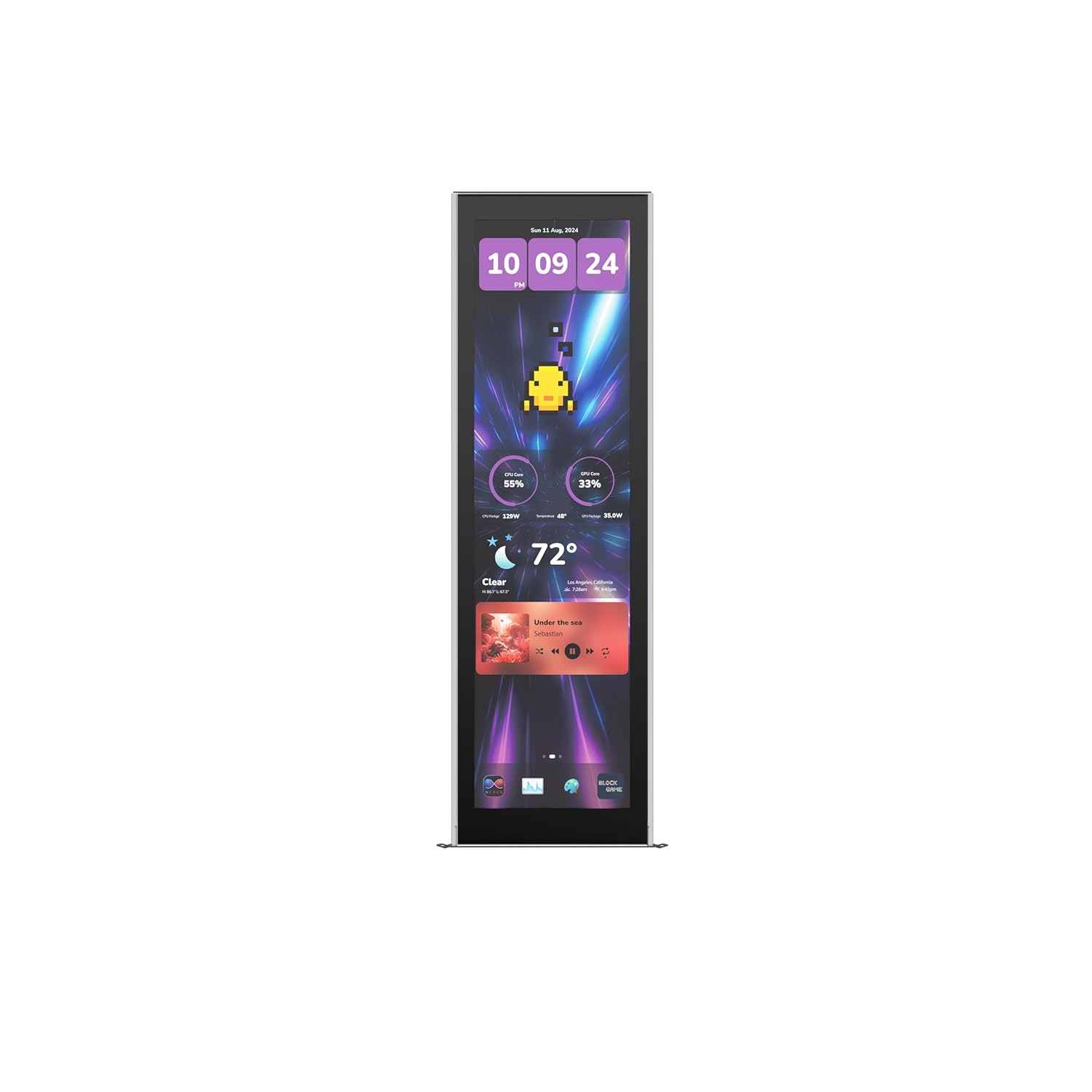
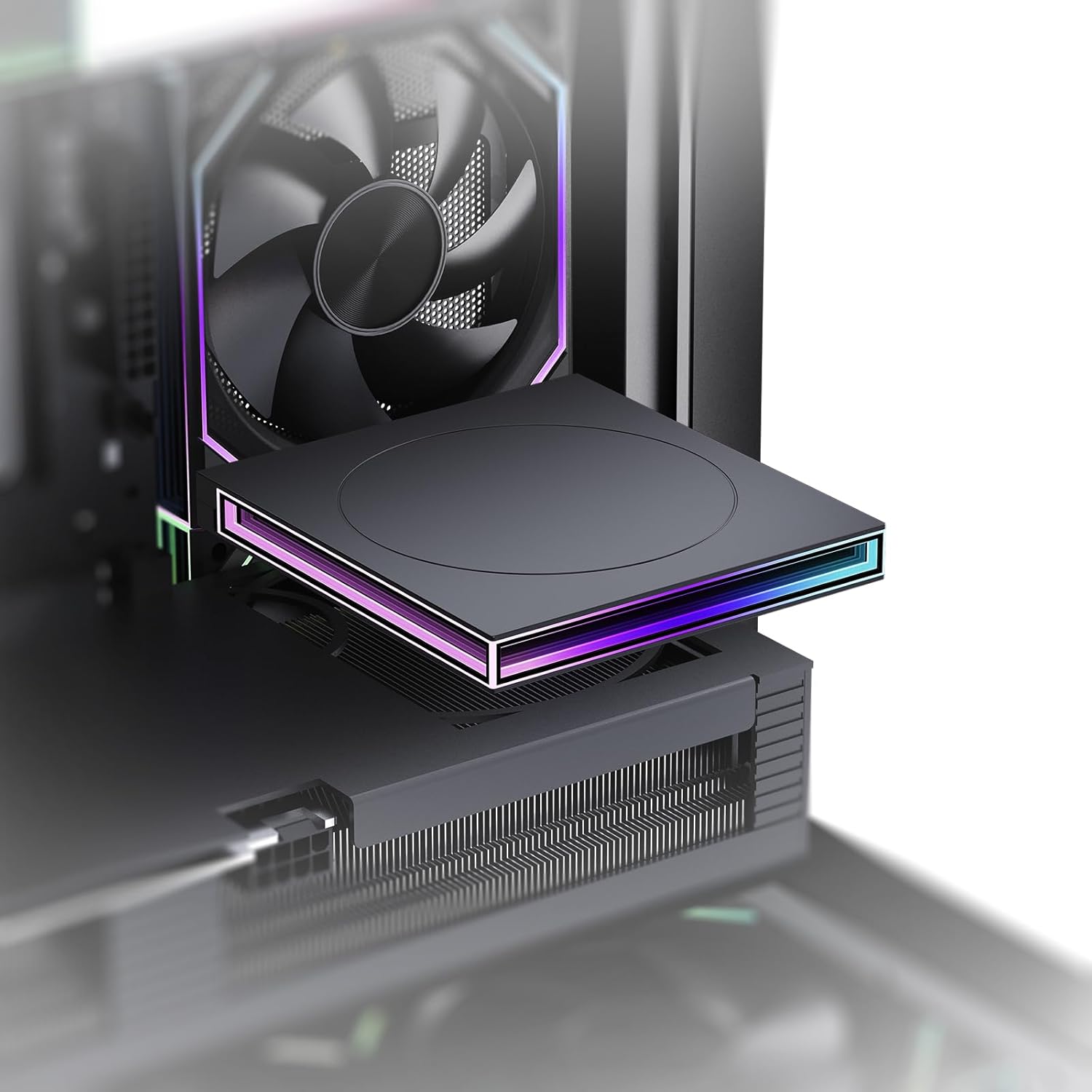
Deciding whether to add the HYTE Y70 Touch Infinite display upgrade comes down to how much you value glanceable hardware diagnostics and chassis personalization. Designed specifically for the base Y70 chassis, this kit replaces the front corner glass panel with a massive 14.9-inch 2.5K capacitive touchscreen. Rather than settling for a standard static window into your graphics card and cooling loops, retrofitting this module turns the chassis corner into an active secondary monitor. It delivers an ultra-tall 682 x 2560 resolution panel engineered directly for real-time telemetry, interactive desktop widgets, and live wallpaper systems without requiring makeshift external tablet stands.
For PC builders who already own the standard Y70 case, this add-on represents an aesthetic and functional transformation that eliminates clunky desk accessories. However, integrating an internal display also introduces clear technical trade-offs, including dedicating a high-bandwidth DisplayPort connector from your graphics card and running background monitoring software. In this comprehensive review, we evaluate the display clarity, software workflow with HYTE Nexus, physical installation steps, hardware resource overhead, and overall value to help you determine if this visual upgrade belongs in your workspace.


What You Get With the HYTE Y70 Touch Infinite
The HYTE Y70 Touch Infinite kit delivers a specialized hardware package tailored to replace the corner panel of compatible mid-tower chassis builds. The package contains the core display module and necessary connectivity interfaces designed to integrate directly into the chassis framework:
In the box
- 14.9-inch capacitive IPS touchscreen display module
- Pre-mounted corner chassis bracket finished in Pitch Black
- Internal DisplayPort video connection interface
- Internal USB data and power interface cabling
- Factory support for HYTE Nexus software customization and widgets
- High-density 682 x 2560 native panel delivering 178 pixels per inch
- Ten-point multi-touch capacitive digitizer layer
Key Specifications
| Screen Size | 14.9 inches |
|---|---|
| Native Resolution | 682 x 2560 (2.5K) |
| Panel Technology | Capacitive IPS LCD |
| Pixel Density | 178 PPI |
| Refresh Rate | 60 Hz |
| Aspect Ratio | 1.45:1 |
| Peak Brightness | 500 nits |
| Contrast Ratio | 1000:1 |
| Viewing Angle | 80 degrees |
| Touch Input | 10-point multi-touch |
| Screen Finish | Glossy |
| Hardware Connectivity | DisplayPort, USB |
| Adaptive Sync Support | FreeSync |
| Dimensions and Weight | 0.91"D x 4.91"W x 15.88"H; 4.2 pounds |
All 36 attributes from the listing
| Aspect Ratio | 1.45:1 |
|---|---|
| Screen Finish | Glossy |
| Contrast Ratio | 1000:1 |
| Refresh Rate | 60 hertz |
| Display Type | LCD |
| Display Technology | IPS |
| Viewing Angle | 80 degrees |
| Brightness | 500 |
| Picture Quality Enhancement Technology | IPS technology, 682 x 2560 resolution, 1000:1 contrast ratio, 60Hz refresh rate |
| Screen Size | 14.9 inches |
| Item Dimensions D x W x H | 0.91"D x 4.91"W x 15.88"H |
| Item Weight | 4.2 pounds |
| Resolution | 682 x 2560 |
| Display Resolution Maximum | 682 x 2560 pixels |
| Native Resolution | 682 x 2560 |
| Connectivity Technology | DisplayPort, USB |
| Hardware Connectivity | DisplayPort, USB |
| Adaptive Sync | FreeSync |
| Additional Features | Portable, Touchscreen |
| Specific Uses For Product | Desktop, Entertainment, Gaming, digital interaction, screen customization, Home Security, Interactive Digital Experiences |
| Color | Black |
| Warranty Type | Limited |
| Shape | Flat |
| Brand | HYTE |
| Model Number | ACC-HYTE-LK-Y7TTI-BB |
| Model Name | 14.9” [PITCH BLACK] HYTE Y70 TOUCH INFINITE DISPLAY UPGRADE |
| Warranty Description | 3 Year Manufacturer |
| UPC | 848604049328 |
| Manufacturer | HYTE |
| Best Sellers Rank | #24,864 in Electronics (See Top 100 in Electronics) #736 in Computer Monitors |
| ASIN | B0FRQJ23ZT |
| Response Time | 30 milliseconds |
| Total Number of HDMI Ports | 1 |
| Total Usb Ports | 1 |
| Number of Component Outputs | 1 |
| Screen Surface Description | Glossy |
Figures as published by the manufacturer on the Amazon listing.
Display Clarity and Visual Immersion
The visual centerpiece of the y70 touch infinite display upgrade is its unusual 14.9-inch IPS panel, which boasts an ultrawide vertical format running at 682 x 2560 pixels. With a pixel density of 178 pixels per inch, the hyte touch infinite 2.5k display exhibits remarkable text sharpness and line definition. Small system telemetry numbers, clock digits, and fine status bars remain cleanly legible without the fuzziness commonly observed on generic auxiliary monitor panels. Builders familiar with high-resolution mobile panels like the apple – 11-inch ipad air m3 will immediately appreciate how the pixel density prevents visible screen-door artifacts when viewing the computer tower from ordinary desk distances.
Luminance is another significant engineering improvement in this revision of the hyte y70 touch infinite screen. Generating 500 nits of brightness, this panel represents a 43 percent increase over previous iterations, ensuring the screen cuts through bright ambient office lighting and complex internal RGB lighting arrays. The glossy screen finish enhances color saturation and black levels, maintaining the stated 1000:1 contrast ratio for deep backgrounds. While the 80-degree viewing angle specification is narrower than traditional flat desktop monitors, the angled corner geometry of the chassis naturally directs the panel face toward the user when the tower sits to the right or left of a primary workstation monitor.
Motion handling is steady and fluid thanks to the 60Hz refresh rate and native FreeSync support. While gaming directly on a vertical 1.45:1 aspect ratio display is impractical, the 60Hz refresh rate ensures that animated wallpapers, system graphs, and dynamic widgets scroll without hitching. Much like the smooth color presentation evaluated on dedicated gaming panels like the switch 2 oled, having a capable IPS foundation prevents color distortion across the entire vertical height of the tower.
HYTE Nexus Software Utility and Daily Workflow
Hardware capability is only as practical as the management tools powering it, and the hyte nexus software y70 ecosystem serves as the operational hub for this display. Nexus enables deep interface customization, allowing you to configure multi-page layouts containing system telemetry, temperature gauges, clock faces, audio visualizers, and quick-launch application docks. Rather than managing third-party system diagnostic utilities that must be manually pinned or rearranged across Windows desktops, Nexus treats the panel as a dedicated dashboard with native themes tailored to its unusual dimensions.
The integrated 10-point capacitive multi-touch interface transforms the panel from a passive diagnostic panel into an interactive surface. Tapping through telemetry screens, changing audio sources, or scrubbing media widgets feels responsive, mirroring the tactile convenience found on convertible computing devices like the laptop yoga 720. For creative professionals and live streamers, having dedicated touchscreen zones right beside the keyboard allows for fast operational adjustments without tabbing out of active applications on the main display.
That said, prospective buyers must recognize the ergonomic reality of a case-mounted touch display. If your PC tower sits beneath your desk on the floor or is pushed back against a wall, using physical touch commands becomes awkward. The multi-touch capability yields maximum utility when the PC case is placed on the desk within arm’s reach. When positioned correctly, having hardware clocks, CPU frequencies, and GPU thermals separated from your primary workflow provides immediate reassurance during intensive rendering or simulation workloads.
Physical Installation and Cable Management Demands
Carrying out the y70 touch screen upgrade install requires basic technical comfort inside your computer case, but the process is straightforward thanks to factory-engineered mounting tolerances. The hyte y70 case display upgrade measures 15.88 inches high, 4.91 inches wide, and 0.91 inches deep, matching the exact corner pillar footprint of the standard chassis. Builders begin by detaching the original corner glass panel and securing the 4.2-pound display assembly into the structural frame using the chassis mounting points.
Cable routing represents the most critical phase of the installation. The screen requires two primary connections: a DisplayPort cable for video feed and a USB cable for power and the 10-point touch data layer. Both cables route cleanly through the chassis interior into the rear cable management chamber. However, because the display utilizes standard DisplayPort video input, builders must route the external DisplayPort lead out through a chassis expansion slot or grommet to connect directly to an available DisplayPort output on their graphics card.
Builders running high-performance hardware configurations, such as systems benchmarked alongside modern gaming rigs like the lenovo legion 5 gen 10 ryzen 7 260 rtx 5060, should verify their GPU port inventory in advance. Most modern graphics cards supply three DisplayPort outputs and one HDMI port. If you are already driving triple monitors or a dual-monitor setup paired with a VR headset, dedicating a full-sized DisplayPort connection to your case panel will exhaust your graphics card’s auxiliary display capacity.
System Overhead and Hardware Compatibility
Understanding the y70 touch infinite specs requires evaluating how Windows handles the secondary display layer. Because the screen communicates via DisplayPort, your operating system registers the display as an active 682 x 2560 secondary desktop. The 1.45:1 aspect ratio requires proper scaling setup inside Windows display settings to ensure mouse cursors do not get unintentionally lost along the extreme vertical boundary of the screen.
From a hardware load perspective, rendering a continuous 2.5K canvas at 60Hz imposes a tiny, measurable background footprint on your graphics card. The HYTE Nexus software also uses a modest allocation of system memory and background CPU cycles to calculate live hardware polling intervals and drive animated visualizers. For modern multi-core processors, this resource allocation is practically imperceptible, but builders seeking absolute minimum background process counts should take note.
Furthermore, because the screen acts as an authentic Windows display output, you are not strictly restricted to the HYTE Nexus interface. You can drag standalone chat windows, streaming monitoring dashboards, system task managers, or media players directly into the panel canvas. The glossy IPS panel preserves broad viewing angles, meaning secondary application windows remain legible even when you sit slightly offset from the tower.
HYTE Y70 Touch Infinite Pros and Cons
Pros
- Sharp 2.5K 178 PPI capacitive IPS display
- Bright 500-nit panel with vibrant contrast
- Seamless factory fit for Y70 chassis
- Responsive 10-point capacitive multi-touch
- Native FreeSync support for fluid visuals
Cons
- Consumes a dedicated GPU DisplayPort output
- Requires desktop placement for practical touch reach
- Exclusive to the HYTE Y70 chassis
Check HYTE Y70 Touch Infinite on Amazon
Is the HYTE Y70 Touch Infinite Worth It
Determining whether the HYTE Y70 Touch Infinite is worth it depends entirely on your desk configuration and personal tolerance for visual flair versus utilitarian minimalism. For enthusiasts who already invested in the Y70 chassis specifically to create a visual statement, this kit fulfills the original design intent of the platform. It replaces passive glass with an incredibly crisp, bright 2.5K canvas that handles system telemetry far more elegantly than aftermarket LCD screens velcroed to radiator fan mounts.
For busy professionals needing constant glanceable system health stats during heavy compilation or rendering workflows, the screen saves valuable primary monitor real estate. Having dedicated thermals, system loads, and music playback controls stationed directly on the chassis creates an organized, multi-display command center. The 500-nit panel brightness and 178 PPI sharpness ensure that the hardware data is effortlessly legible from normal sitting positions.
Conversely, if your PC case sits on the floor beneath your desk, the value proposition drops drastically. You will neither appreciate the visual fidelity nor reach the 10-point touch digitizer comfortably. Furthermore, multi-monitor power users who have already occupied every output on their GPU will find the mandatory DisplayPort requirement inconvenient. If you have the desktop space and an open GPU port, this display upgrade stands as the most seamless, polished integrated chassis monitor available today.
Other Options to Consider
| Model | Our score | Why it is here |
|---|---|---|
 HYTEHyte Y70 Touch Infinite Display Upgrade Screen Kit for PC Case -…Reviewed here HYTEHyte Y70 Touch Infinite Display Upgrade Screen Kit for PC Case -…Reviewed here |
8.8/10Very good | The model reviewed on this page. View listing |
 Kernmax507Pcs Professional Computer Screws Assortment Kit, Includes Motherboard Screws, Standoffs, PC Case,… Kernmax507Pcs Professional Computer Screws Assortment Kit, Includes Motherboard Screws, Standoffs, PC Case,… |
9.2/10Very good | 507Pcs Professional Computer Screws Assortment suits builders who prioritize practical chassis construction, standoff replacements, and general hardware maintenance over interactive screens, providing a comprehensive fastener kit for mounting components rather than visual display telemetry. View listing |
 Jungle LeopardPC Case ARGB Square Figurine Shelf, Figure Stand, Infinity Mirror Design Floating… Jungle LeopardPC Case ARGB Square Figurine Shelf, Figure Stand, Infinity Mirror Design Floating… |
9.0/10Very good | PC Case ARGB Square Figurine suits PC enthusiasts who want to customize the interior aesthetic of their desktop case with addressable lighting and display pedestals without installing software suites, managing video cables, or dedicating a graphics card port to a digital monitor. View listing |
 MoKoMoKo 400x300mm DIY PC Case Dust Mesh Fan Filter, 1mm Hole, 2… MoKoMoKo 400x300mm DIY PC Case Dust Mesh Fan Filter, 1mm Hole, 2… |
9.2/10Very good | DIY Cut-to-size Design suits system builders focused strictly on thermal defense, airflow optimization, and dust management, offering customizable mesh filters that protect chassis internals rather than adding multimedia touchscreens. View listing |
Scores are out of 10, based on listed specifications and buyer feedback. Prices are the ones on the listing when this page was written.
FAQ
What video connection does the HYTE Y70 Touch Infinite require?
The display kit requires a dedicated DisplayPort connection directly from your graphics card to drive its native 682 x 2560 video signal, along with an internal USB connection to handle power delivery and the capacitive multi-touch interface.
Can the display be used as an ordinary Windows monitor?
Yes. The Windows operating system detects the panel as a standard secondary monitor running at 682 x 2560 resolution. You can move ordinary desktop applications, media players, task managers, and web browser tabs directly onto the screen alongside or outside of the HYTE Nexus software.
How does this screen improve upon earlier integrated case displays?
The Touch Infinite kit features an upgraded 14.9-inch 2.5K panel with a 43 percent brighter backlight reaching 500 nits, an improved 1000:1 contrast ratio, 178 pixels per inch density, and native FreeSync support for smoother dynamic rendering.
Can this screen kit be installed in other computer cases?
No. The display kit is specifically engineered to match the structural dimensions, corner angle, and mounting brackets of the HYTE Y70 chassis series and cannot be mounted natively into standard rectangular PC enclosures.
Does the touch functionality work without the HYTE Nexus software running?
Yes. The 10-point multi-touch digitizer operates as a standard Windows touch input device through its USB connection, though the HYTE Nexus software is required to access custom telemetry widgets, preconfigured themes, and interactive dashboard layouts.
More PC Components & Storage ratings
See the section
ASUS ROG Strix RTX 4070 Super: Definitive Performance Breakdown
Choosing the right GPU for an intensive workstation requires balancing raw compute capability, sustained thermal headroom, and acoustic isolation under heavy render loads. The…

MSI Z270 Gaming M7 Motherboard: Full Feature & Performance Breakdown
Replacing a defective motherboard in an operational workstation or gaming system often forces an expensive decision between a full hardware overhaul and finding a…
AMD Ryzen 5 5600 Desktop Processor: The Pragmatic AM4 Upgrade
If you need a dependable, high-efficiency processor to upgrade an aging desktop, the AMD Ryzen 5 5600 is an exceptional choice for modern multitasking…
Buyer favourite Scored 9.0+/10

Kingston Canvas Go! Plus 256GB microSDXC: A Fast, Reliable Field Storage Solution
For creators capturing high-bitrate aerial footage, action photography, and handheld gaming libraries, finding reliable storage that prevents dropped frames without overspending on unnecessary cinema…

MSI MAG B860 Tomahawk WiFi: The Pragmatic LGA 1851 Motherboard
For system builders and technical professionals deploying Arrow Lake desktop systems, choosing an intel b860 lga 1851 motherboard represents a calculated decision to bypass…
Get new ratings by email
A weekly digest of the products added to the ratings pages.