Microsoft Surface Pro 4 Core M: The Concise Buying Guide
For mobile professionals seeking an ultra-quiet 2-in-1 device for administrative tasks, reading, and client presentations, the Microsoft Surface Pro 4 configured with the Intel Core M processor represents a specialized entry point…
By Marcus Osborne 10 min read

Microsoft Surface Pro 4
Microsoft
Fair
Our score: 7.4/10
Scores are out of 10, based on listed specifications and buyer feedback.
- Specs listed
- 10
- Section
- Phones & Tablets
Check price on Amazon We may earn a commission if you buy through this link.
As Amazon Associates, we earn from qualifying purchases. This means we may receive a small commission at no extra cost to you if you click through and make a purchase.
For mobile professionals seeking an ultra-quiet 2-in-1 device for administrative tasks, reading, and client presentations, the Microsoft Surface Pro 4 configured with the Intel Core M processor represents a specialized entry point into the detachable ecosystem. Built around a 6th generation Intel Core M chip, 4GB of system memory, and 128GB of internal solid-state storage, this particular hardware revision is designed specifically around passive cooling. The absence of an internal mechanical fan ensures silent operation throughout the workday, making it an attractive choice for quiet meeting rooms, executive boardrooms, and distraction-free home office setups. However, balancing silence against compute throughput requires an honest appraisal of what an entry-tier processor and a non-upgradable memory footprint can reasonably deliver under modern multitasking workloads.
Prospective buyers must determine whether the energy-efficient architecture of this tablet matches their daily operational requirements or if modern enterprise workflows will overwhelm its hardware bounds. For users exploring secondary market hardware or evaluating a surface pro refurbished option, understanding these hardware limitations is essential before deploying the device for daily business duties. This concise buying guide details the real-world performance of the fanless configuration, examines display and inking capabilities, analyzes actual battery endurance expectations, clarifies operating system support, and contrasts this legacy device against current alternatives so you can make an immediate, well-informed investment decision.
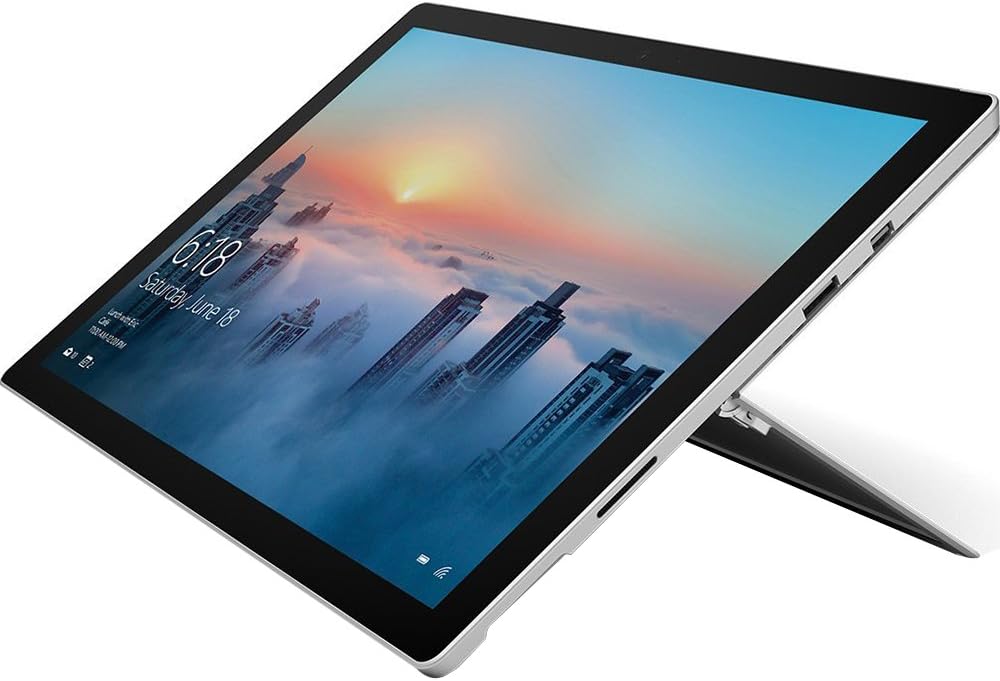


What You Get With the Microsoft Surface Pro 4
The retail package for the Intel Core M configuration focuses on the fundamental tablet experience, shipping as a standalone device without optional productivity accessories. Inside the original packaging, buyers receive the following hardware components and documentation:
In the box
- Microsoft Surface Pro 4 tablet unit (Model FML-00001)
- Dedicated Microsoft power supply adapter
- Quick start guide for system setup and initial onboarding
- Safety and warranty guide documentation
- Pre-installed Windows 10 operating system with Anniversary Update support
- One-year limited manufacturer warranty coverage
Key Specifications
Understanding the exact hardware foundation of this specific configuration helps establish accurate expectations for performance and software capability. The primary surface pro 4 core m specs are detailed in the reference table below:
| Processor | 6th Generation Intel Core M |
|---|---|
| System Memory | 4GB RAM (Maximum memory capacity: 4GB) |
| Internal Storage | 128GB Solid State Drive |
| Display | 12.3-inch Pixel Sense Display with 10-point multi-touch |
| Cooling Design | Fanless passive thermal management |
| Biometric Security | Windows Hello infrared facial recognition camera |
| Battery Longevity | Up to 9 hours of video playback |
| Pen Compatibility | Windows Ink certified (Surface Pen sold separately) |
| Model Number | FML-00001 (Model Year 2017) |
| Operating System | Windows 10 Pro / Windows 10 Anniversary Update |
All 61 attributes from the listing
| Brand | Microsoft |
|---|---|
| Model Name | Microsoft Surface Pro 4 (Intel Core M, 4GB RAM, 128GB) with Windows 10 |
| Generation | 6th Generation |
| Model Year | 2017 |
| Age Range Description | Adult |
| Included Components | Power Supply, Quick Start Guide, Safety and warranty guide, Surface Pro 4 |
| Warranty Description | 1 year limited manufacturer's warranty |
| Model Number | FML-00001 |
| Specific Uses For Product | personal, gaming, business |
| UPC | 889842191608 |
| Number of Items | 1 |
| Style Name | Device only |
| Manufacturer | Microsoft |
| Number of Packs | 1 |
| Configuration | Intel Core M, 4GB RAM, 128GB |
| Unit Count | 1 Count |
| Size | Intel Core M, 4GB RAM, 128GB |
| Model Series | Surface Pro 4 |
| Global Trade Identification Number | 00889842191608 |
| Item Type Name | Microsoft Surface Pro 4 (Intel Core M, 4GB RAM, 128GB) with Windows 10 Anniversary Update (FML-00001) |
| Mfr Part Number | FML-00001 |
| Best Sellers Rank | #534,428 in Electronics (See Top 100 in Electronics) #6,366 in Computer Tablets |
| ASIN | B01N4OZN8B |
| Hardware Interface | Bluetooth, Bluetooth 4.0, MicroSD, USB 3.0 |
| Wireless Technology | Bluetooth |
| Total Usb Ports | 2 |
| Connectivity Technology | USB |
| Wireless Compability | 802.11b, 802.11g, 802.11n |
| Video Capture Resolution | HD 720p |
| Camera Description | Front, Rear |
| Rear Facing Camera Photo Sensor Resolution | 5 mp |
| Photo Sensor Resolution | 5 mp |
| Video Processor | Intel |
| Item Weight | 1.7 pounds |
| Graphics Coprocessor | Intel HD Graphics 515 |
| Human-Interface Input | Touchscreen with Stylus Support |
| Graphics Description | Integrated |
| Compatible Devices | Surface Pen, Power Supply |
| Warranty Type | Limited |
| Software Update Supported to Date | unknown |
| Screen Size | 12.3 inches |
| Display Resolution Maximum | 2736 x 1824, 267 PPI pixels |
| Display Type | LCD |
| Native Resolution | 2736×1824 |
| Aspect Ratio | 16:9 |
| Memory Storage Capacity | 128 GB |
| RAM Memory Installed | 4 GB |
| Memory Slots Available | 1 |
| RAM Size | 4 GB |
| Hard-Drive Size | 128 GB |
| Battery Average Life | 9 hours |
| Battery Capacity | 39.5 watt-hours |
| Battery Cell Type | Lithium Ion |
| Lithium-Battery Energy Content | 39.5 watt-hours |
| Processor Speed | 2.2 GHz |
| Processor Description | 6th Gen Intel® Core™ m3-6Y30 with Intel® HD graphics 515 |
| Processor Brand | Intel |
| CPU Model Number | Core M |
| CPU Model Speed Maximum | 2.2 GHz |
| Other Special Features of the Product | Windows Ink, PixelSense Display |
| Biometric Security Feature | Windows Hello |
Figures as published by the manufacturer on the Amazon listing.
Fanless Architecture and Everyday Performance
The defining technical attribute of this configuration is its fanless thermal design. While the higher-tier Core i5 and Core i7 variants of this generation rely on active cooling fans to exhaust heat, the surface pro 4 fanless tablet operates in total silence. Without spinning fan blades, the chassis will never generate acoustic noise during phone calls, executive briefings, or late-night research sessions. The absence of mechanical exhaust vents also reduces the accumulation of internal dust over time, supporting physical longevity in varied office environments. However, passive cooling means the system manages thermal load strictly through its magnesium alloy chassis, resulting in gentle thermal throttling when subjected to prolonged, resource-intensive operational bursts.
When assessing raw surface pro 4 core m performance, expectations must remain aligned with the dual-core architecture of the 6th generation processor. Basic productivity duties—such as writing reports in Microsoft Word, reviewing PDF contracts, communicating via Slack, and managing email in Outlook—run smoothly. The limitation appears when handling intensive multitasking or web browsing with dozens of script-heavy browser tabs open simultaneously. Because the system utilizes a fixed 4GB memory capacity that cannot be expanded post-purchase, aggressive multitasking forces Windows to page data onto the SSD storage drive, resulting in momentary interface stutters when switching rapidly between heavier desktop applications.
For professionals who need a lightweight secondary workstation for basic operational duties, the processing balance mirrors what many users look for in compact mobile devices like the microsoft surface go 2. It provides dependable execution for structured, single-task workflows, document sign-offs, and administrative data entry. However, if your daily workflow demands running local virtual machines, rendering complex database queries, or processing massive data sheets with thousands of active calculations, this configuration will rapidly hit its operational ceilings.
Display Quality and Digital Inking Workflow
The visual centerpiece of this hardware is the 12.3-inch surface pro 4 pixel sense display. Microsoft engineered this screen with a productivity-oriented 3:2 aspect ratio, which offers substantially more vertical screen real estate than conventional 16:9 widescreen tablets. This vertical layout proves exceptionally beneficial for business professionals, as it displays more lines of text in documents, larger sections of financial spreadsheets, and complete pages of digital journals without requiring constant scrolling. Text rendering is sharp and clear, reducing eye fatigue during prolonged reading sessions and detailed contract reviews.
Pen and touch interaction represent another major functional pillar of the Pixel Sense panel. The display supports Windows Ink technology, allowing users to interact naturally with documents, annotate digital drafts, and capture handwritten meeting notes. A convenient feature of the operating system integration is the ability to launch notes directly from the lock screen without logging into the desktop environment first. This mirrors the speed of jotting ideas onto a physical notepad, providing immediate utility during fast-paced business calls or spontaneous collaborative discussions.
It is important to remember that the Surface Pen is sold separately and is not included inside the standard retail packaging. If your daily workflow relies heavily on sketching diagrams, marking up architectural drawings, or collecting client signatures on digital agreements, you must budget for a compatible stylus. When paired with a pen, the glass surface offers a responsive, tactile writing feel with low latency, transforming the tablet into an effective digital clipboard for paperwork-intensive industries.
Real-World Battery Life and Mobile Portability
Microsoft rates the surface pro 4 core m battery life at up to 9 hours of continuous local video playback under standardized conditions. While continuous offline video playback represents an efficient baseline test, active productivity routines introduce higher power drains. In real-world business scenarios—involving dynamic Wi-Fi connectivity, Bluetooth peripheral use, cloud synchronization, moderate display brightness, and multiple background applications—practical endurance settles noticeably below the maximum advertised figure. Professionals should reasonably expect between 5 and 6 hours of continuous office productivity on a single charge.
Because the Intel Core M processor runs at a modest thermal design power, it exhibits minimal battery drain while idling or handling basic full-screen text editing. Standby power efficiency is well-managed under Windows 10, allowing the tablet to preserve charge across brief intervals between meetings. However, continuous web browsing with media-rich websites, interactive web dashboards, or video conferencing platforms will accelerate battery depletion. When planning for full workdays away from a fixed desk, keeping the compact OEM power supply within reach remains necessary.
From a physical portability perspective, this tablet excels as a lightweight travel companion. Without the internal weight of cooling fans and heavy copper heat pipes, the tablet chassis is exceptionally slim and easy to handle one-handed during warehouse walk-throughs or client presentations. The integrated multi-position kickstand articulates smoothly, allowing you to angle the screen from an upright presentation orientation down to a low drafting angle on airline tray tables and conference room desks alike.
Operating System Support and Business Software
When deploying the surface pro 4 core m for business operations, enterprise security and operating system capabilities are paramount. The device ships with Windows 10, including the Anniversary Update, and natively supports Windows 10 Pro features. This includes robust commercial security protocols such as built-in Windows Defender anti-virus, hardware-assisted firewall defenses, and anti-phishing safeguards designed to protect organizational data. Furthermore, the front-facing camera array includes an infrared biometric sensor that powers Windows Hello, delivering fast, password-free facial recognition logins that streamline device access without compromising corporate login standards.
The product documentation notes compatibility with professional-grade enterprise platforms, citing software environments such as Citrix, Adobe Creative Cloud, and AutoCAD. While the underlying x86 architecture of the microsoft surface pro 4 intel core m allows these full desktop suites to install and execute natively, performance varies dramatically depending on project complexity. Enterprise remote desktop tools like Citrix Workspace run effortlessly because the heavy computational heavy lifting occurs on remote host servers. The tablet simply acts as a secure, high-resolution client terminal for those hosted sessions.
Conversely, running heavyweight local applications like AutoCAD or multi-layered Adobe Creative Cloud projects locally requires caution. The fixed surface pro 4 4gb ram 128gb configuration provides sufficient headroom for viewing blueprints, minor 2D drawing adjustments, and lightweight graphic touch-ups. Attempting to render dense 3D CAD assemblies or complex multi-track video timelines will exhaust available memory, resulting in sluggish tool response times. Modern enterprise users needing serious mobile compute power for intensive software typically migrate toward high-end contemporary machines such as the microsoft surface pro 11, leaving this legacy Core M unit to handle administrative, cloud-first, and client-facing terminal assignments.
Microsoft Surface Pro 4 Pros and Cons
Pros
- Completely silent fanless passive cooling architecture
- Sharp 12.3-inch Pixel Sense 3:2 touchscreen
- Secure password-free Windows Hello facial authentication
- Lightweight magnesium alloy chassis for travel
- Native Windows Ink digital handwriting support
Cons
- Fixed 4GB memory limits heavy multitasking
- Surface Pen must be purchased separately
- Thermal throttling under sustained processing loads
Check Microsoft Surface Pro 4 on Amazon
Is the Microsoft Surface Pro 4 Worth It
Determining whether the is surface pro 4 core m worth it proposition fits your current needs depends entirely on the scope of your daily work and software demands. For professionals who require a distraction-free, completely silent Windows machine dedicated to word processing, reviewing documents, reading digital publications, and accessing cloud-based software, this hardware remains an elegant piece of industrial design. Its premium magnesium casing, high-resolution Pixel Sense display, and responsive touchscreen deliver an executive feel that matches dedicated office environments.
However, users whose daily routines involve aggressive browser multitasking, large local databases, graphic design workflows, or heavy data crunching should pass on this specific configuration. The strict ceiling of 4GB of non-upgradable RAM and the power-thrifty dual-core processor create hard operational boundaries that cannot keep pace with heavy resource demands. If you push the device past its intended scope, software bottlenecks will compromise productivity and cause workflow friction.
In summary, the Intel Core M variant of the Surface Pro 4 serves best as an auxiliary mobile terminal, a digital notebook, or a lightweight travel companion for basic office administrative tasks. Buyers who respect its hardware parameters and maintain disciplined application usage will appreciate its silent operation, exceptional display quality, and dependable Windows compatibility.
Other Options to Consider
| Model | Our score | Why it is here |
|---|---|---|
 MicrosoftMicrosoft Surface Pro 4 (Intel Core M, 4GB RAM, 128GB) with Windows…Reviewed here MicrosoftMicrosoft Surface Pro 4 (Intel Core M, 4GB RAM, 128GB) with Windows…Reviewed here |
7.4/10Fair | The model reviewed on this page. View listing |
 AmazonAmazon Fire HD 10 tablet, built for relaxation, 10.1" vibrant Full HD… AmazonAmazon Fire HD 10 tablet, built for relaxation, 10.1" vibrant Full HD… |
9.0/10Very good | Amazon Fire HD 10 tablet suits users who want a dedicated media consumption, reading, and relaxation slate rather than a desktop Windows operating environment. Featuring a 10.1-inch Full HD screen, octa-core processing, 4GB of RAM, and 32GB of storage, it provides a streamlined experience for streaming video, reading ebooks, and casual tablet navigation at a significantly lower hardware complexity. View listing |
 OukitelRT9 Rugged Tablet 11000mAh Battery 10.1”FHD Display Android Tablet OukitelRT9 Rugged Tablet 11000mAh Battery 10.1”FHD Display Android Tablet |
8.4/10Good | 24GB RAM 256GB ROM appeals directly to field technicians, industrial workers, and outdoor professionals who need extreme structural durability rather than an office-styled 2-in-1 slate. With a drop-proof and waterproof rugged enclosure, glove-friendly touchscreen, dual SIM mobile connectivity, an expansive 11,000mAh battery, and a loud 93dB speaker, it is engineered to survive harsh worksite conditions where a delicate magnesium tablet cannot safely operate. View listing |
 URAO FlagshipURAO Tablet,10.1" Android 16 Tablet Octa-core 36GB+128GB Dual Camera URAO FlagshipURAO Tablet,10.1" Android 16 Tablet Octa-core 36GB+128GB Dual Camera |
9.0/10Very good | 1280×800 IPS HD Touchscreen 6000mAh fits cost-conscious buyers looking for an accessible Android-based media tablet for general browsing, casual apps, and video playback. Built with an octa-core platform, modern Wi-Fi 6, Bluetooth 5.4, 128GB of internal storage with 1TB expansion support, and a 6000mAh battery, it provides an economical multimedia companion for basic household and travel entertainment. View listing |
Scores are out of 10, based on listed specifications and buyer feedback. Prices are the ones on the listing when this page was written.
FAQ
Does the Microsoft Surface Pro 4 include the Surface Pen in the box?
No, the Surface Pen is sold separately for this specific retail configuration. The product package includes the Surface Pro 4 tablet, the OEM power supply, a quick start guide, and the safety and warranty documentation. If you intend to use Windows Ink for handwritten notes, digital sketching, or document markup, you will need to acquire a compatible Surface Pen or stylus accessory independently.
Can the 4GB RAM on this Surface Pro 4 configuration be upgraded later?
No, the system memory cannot be upgraded after purchase. The 4GB of RAM is permanently soldered to the main motherboard during manufacturing, and Microsoft specifies a maximum memory capacity of 4GB for this model. Because memory expansion is impossible, buyers must ensure that 4GB provides sufficient headroom for their anticipated software workload before acquiring this machine.
Is the Intel Core M version of the Surface Pro 4 completely fanless?
Yes, this configuration features a fanless cooling design. While the higher-specification Intel Core i5 and Core i7 versions of the Surface Pro 4 include internal mechanical fans, the low-wattage 6th generation Intel Core M chip operates entirely via passive heat dissipation through the magnesium chassis, ensuring silent computing under all operational workloads.
Does this tablet support Windows Hello facial recognition logins?
Yes, the device features built-in Windows Hello biometric authentication. An integrated front-facing infrared camera scans your facial features to provide instant, secure password-free access directly to the Windows desktop environment without requiring manual pin or password entry.
What is the typical real-world battery life for office tasks?
While the manufacturer lists up to 9 hours of continuous local video playback under controlled testing conditions, everyday business productivity generally yields between 5 and 6 hours of active use. Running continuous Wi-Fi web browsing, cloud software synchronization, and office productivity suites will consume more energy than passive video playback.
More Phones & Tablets ratings
See the section
Microsoft Surface Pro OLED: A Decisive Executive Guide
Evaluating a mobile workstation upgrade requires balancing raw processing efficiency against battery longevity, and the Surface Pro 11 OLED directly addresses this balance for…

LG Velvet 5G: A Decisive Review for Working Professionals
Choosing the right mobile hardware requires balancing daily responsiveness, screen real estate, and long-term durability against enterprise workflows. The LG Velvet 5G arrives as…

Wacom One 14 Pen Display: The Executive Buying Verdict
Visual markup, whiteboard presentations, and precise document annotations demand hardware that bridges tactile drawing with dependable desktop stability. If you want a dedicated pen…

Apple iPad Air 13-Inch: Efficiency, Specs, and Buying Verdict
Deciding on a high-performance tablet comes down to balancing screen real estate against mobility, and the Apple iPad Air 13-inch provides a direct answer…

Vortex Pro 1-Inch Cantilever Mount Review: Quick Buying Decision
Evaluating a one-piece scope base requires looking closely at optical centerline elevation, eye relief extension, and rigid clamping force. The Vortex Pro 1-Inch Cantilever…
Get new ratings by email
A weekly digest of the products added to the ratings pages.