Microsoft Surface Hub 2S: Executive Collaboration Guide
Evaluating enterprise collaboration hardware requires balancing interactive capabilities against existing infrastructure. The Microsoft Surface Hub 2S addresses modern business meeting rooms by unifying a 50-inch interactive display with an integrated Windows 10…
By Zachary Chapman 9 min read
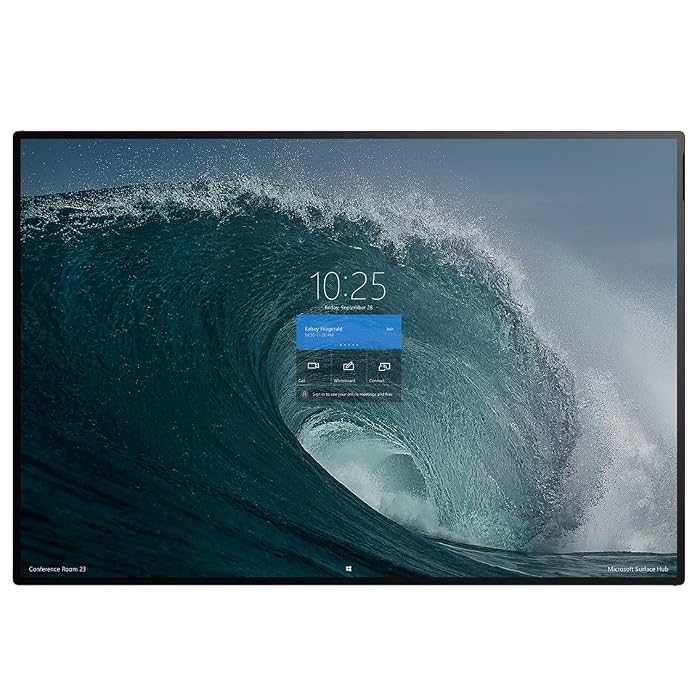
Microsoft Surface Hub 2S
Microsoft
Excellent
Our score: 9.4/10
Scores are out of 10, based on listed specifications and buyer feedback.
- Specs listed
- 10
- Section
- Monitors
Check price on Amazon We may earn a commission if you buy through this link.
As Amazon Associates, we earn from qualifying purchases. This means we may receive a small commission at no extra cost to you if you click through and make a purchase.
Evaluating enterprise collaboration hardware requires balancing interactive capabilities against existing infrastructure. The Microsoft Surface Hub 2S addresses modern business meeting rooms by unifying a 50-inch interactive display with an integrated Windows 10 all-in-one computer. Rather than functioning as a standard presentation monitor, this specialized desktop system is built to facilitate digital collaboration, team conferencing, and real-time document interaction across executive boardrooms and agile workspaces. In this comprehensive microsoft surface hub 2s review, we assess whether this dedicated corporate canvas delivers the day-to-day utility necessary to justify replacing conventional meeting displays.
This analysis focuses on the 50-inch model configured with an Intel Core i5 processor, 8 GB of DDR4 SDRAM, 128 GB of SSD storage, and an ultra-sharp 3840 x 2560 touchscreen display powered by Intel UHD Graphics 620. Prospective buyers should anticipate a device optimized specifically for cloud-based office teamwork and interactive whiteboarding rather than intense local processing or complex media production. In the sections below, we examine its display precision, hardware performance, connectivity options, enterprise operating environment, and competitive alternatives to help organizational leaders make an informed purchasing decision.


What You Get With the Microsoft Surface Hub 2S
The Microsoft Surface Hub 2S arrives as an integrated all-in-one computer engineered specifically for corporate and commercial deployment. Encased in a refined platinum silver chassis, the system bundles computing power, visual display, and connectivity into a self-contained unit. Based on the manufacturer listing, the core package features the following components:
In the box
- 50-inch touchscreen display featuring a 3840 x 2560 pixel resolution
- Intel Core i5 series processor designed for steady business performance
- 8 GB of DDR4 SDRAM system memory
- 128 GB solid-state drive for operating storage
- Integrated Intel UHD Graphics 620 controller
- Pre-installed Windows 10 operating system configured for business use
- Built-in wireless connectivity for network integration
- HDMI hardware interface supporting external video input and output
- Integrated air cooling thermal management system
- TAA compliant manufacturing for regulated enterprise environments
Key Specifications
| Screen Size | 50 inches |
|---|---|
| Display Resolution | 3840 x 2560 pixels |
| Operating System | Windows 10 |
| Processor Series | Intel Core i5 |
| Graphics Controller | Intel UHD Graphics 620 |
| Installed System Memory | 8 GB DDR4 SDRAM |
| Storage Capacity | 128 GB Solid State Drive (SSD) |
| Video Interfaces | HDMI Input and HDMI Output |
| Network Connectivity | Wireless |
| Regulatory Compliance | TAA Compliant |
All 57 attributes from the listing
| Specific Uses For Product | Business |
|---|---|
| Personal Computer Design Type | All in One |
| Color | Silver |
| Additional Features | Touchscreen |
| Hard Disk Description | SSD |
| Hardware Interface | HDMI |
| Video Output Interface | HDMI |
| Hard Disk Interface | Solid State |
| Style Name | Silver |
| Cooling Method | Air |
| Video Output | HDMI |
| Memory Storage Capacity | 128 GB |
| RAM Memory Installed | 128 GB |
| RAM Memory Technology | DDR4 |
| Ram Memory Maximum Size | 8 GB |
| RAM Type | DDR4 SDRAM |
| Processor Series | Core i5 |
| Processor Speed | 3.7 |
| Processor Socket | LGA 1151 |
| Processor Count | 1 |
| CPU Model Speed Maximum | 3.6 GHz |
| Total Number of HDMI Ports | 1 |
| Number of Component Outputs | 1 |
| Human-Interface Input | Touchscreen |
| Keyboard Description | [Inferred: Standard full-sized keyboard for general use] |
| Keyboard Layout | QWERTY |
| Brand | Microsoft |
| Model Number | 889842465501 |
| Model Name | Surface Hub 2S |
| Built-In Media | Keyboard, Mouse |
| Processor Brand | Intel |
| CPU Model Number | 8305G |
| Video Processor | Intel |
| Unit Count | 1 Count |
| UPC | 889842465501 |
| Manufacturer | MICROSOFT |
| Best Sellers Rank | #108,656 in Computers & Accessories (See Top 100 in Computers & Accessories) #1,343 in All-in-One Computers |
| ASIN | B08L6T9HP9 |
| Graphics Description | Dedicated |
| Graphics Coprocessor | Intel UHD Graphics 620 |
| Graphics Ram Type | Shared |
| Graphics Card Interface | Integrated |
| Screen Size | 50 inches |
| Display Resolution Maximum | 3840×2560 pixels |
| Display Type | LCD or LED |
| Aspect Ratio | 16:9 |
| Resolution | 3840 x 2560 |
| Native Resolution | 3840 x 2560 |
| Connectivity Technology | Bluetooth |
| Wireless Compability | Bluetooth |
| Wireless Technology | Bluetooth |
| Speaker Description | Two stereo speakers |
| Speaker Type | Stereo |
| CPU Model | Core i5 |
| CPU Speed | 3.7 |
| Graphics Card Description | Dedicated |
| Personal computer design type | All in One |
Figures as published by the manufacturer on the Amazon listing.
Display Precision and Visual Performance
The centerpiece of the hardware is the surface hub 2s 50 inch screen, which delivers an expansive 3840 x 2560 resolution. Unlike standard commercial flat panels that use widescreen 16:9 aspect ratios, this display utilizes a 3:2 aspect ratio that increases vertical screen real estate. This taller format proves advantageous during strategic planning meetings, permitting expansive viewing of spreadsheets, detailed design mockups, and extensive document pages without constant vertical scrolling. The panel clarity ensures that fine text and complex diagrams remain sharp whether participants sit near the display or across an executive conference table.
Touch responsiveness represents another vital element of the surface hub 2s touchscreen display. As a surface hub 2s interactive display, the panel translates multi-finger navigation, panning, and fine-line drawing with minimal latency. The onboard Intel UHD Graphics 620 delivers sufficient throughput to render fluid digital ink strokes and transitions during fast-paced brainstorming sessions. Team members can easily interact with interface elements, annotate shared documents, or rearrange digital sticky notes directly on the glass surface without experiencing frustrating input delays.
Visual fidelity also influences meeting productivity and user fatigue during prolonged collaborative sessions. The high-density pixel layout eliminates visible grid lines and pixelation, providing an experience comparable to working on an enlarged premium tablet. When team members bring their own devices to meetings—such as an executive sharing a presentation from a microsoft surface laptop 7—the projected materials scale cleanly across the 50-inch surface, maintaining crisp typographic definition and accurate visual hierarchy for everyone in the room.
Hardware Capability and Daily Workflow Execution
A realistic evaluation of the surface hub 2s specs requires understanding the balance between collaborative capability and computing power. Built around an Intel Core i5 processor paired with 8 GB of DDR4 SDRAM, the system is calibrated for business communication tasks, interactive whiteboards, and web-based workspace navigation. For running unified communication platforms, multi-party video conferences, and live document co-authoring, the hardware maintains consistent responsiveness throughout typical office workdays.
Internal storage is limited to a 128 GB solid-state drive, reflecting a cloud-first hardware architecture. This 128 GB SSD provides fast system startup, swift operating system resume times, and quick application launching. However, because local capacity is lean, the hardware is not intended to function as an offline repository for massive multi-gigabyte video libraries or localized databases. Organizations must configure their workflows around cloud storage platforms like Microsoft OneDrive and enterprise network shares so meeting notes and session boards save automatically to remote accounts.
IT planners should also recognize the compute ceiling imposed by the 8 GB DDR4 memory configuration and Core i5 processor. While thoroughly capable of driving business productivity applications, the hardware is not configured for intensive local computing tasks like multi-layered 3D CAD modeling or local video rendering. In scenarios where heavy computational power is necessary, individual contributors can perform the heavy processing on separate client hardware—such as a portable surface pro refurbished device—and cast the resulting graphics directly to the hub for group review and real-time markup.
Enterprise Connectivity and Operating Environment
Operating environment stability is a cornerstone of the surface hub 2s windows 10 platform. Because it operates on Windows 10, the device integrates directly into existing corporate Active Directory domains, Azure Active Directory tenants, and mobile device management systems like Microsoft Intune. IT administrators can enforce corporate security policies, manage software patches, and push enterprise certificates using the identical administrative tools they employ for employee desktops, avoiding the configuration silos common with proprietary meeting displays.
Physical and network connectivity options provide essential versatility for diverse office setups. The listing specifies wireless network support, allowing deployment in conference rooms where running physical ethernet drops would require costly renovation. For direct video routing, the device features dedicated HDMI input and output hardware interfaces. Presenters can connect external hardware via HDMI to present content without connecting to the local Wi-Fi network, and the HDMI output allows video to mirror to auxiliary displays in larger presentation halls. Thermal stability is maintained via an air cooling system that keeps internal components within proper operating temperatures without generating disruptive acoustic noise during important discussions.
For organizations with strict compliance mandates, the system carries certified TAA compliance, making it suitable for federal agencies, defense contractors, and regulated corporate environments subject to United States trade agreements. When establishing hybrid meeting workflows across distributed office branches, having a standardized Windows environment allows seamless interaction with remote team members collaborating on mobile systems like a microsoft surface book 4, ensuring consistency across disparate locations.
Collaboration and Digital Whiteboard Usability
The primary operational role of the surface hub 2s digital whiteboard is transforming static conference presentations into engaging collaborative working sessions. The device eliminates the traditional friction of erasing physical whiteboards, taking photographs of dry-erase markers, and transcribing meeting notes into digital formats. Teams can open a limitless digital canvas, brainstorm ideas, paste live documents, and instantly share the resulting workspace with both local and remote attendees via standard enterprise cloud services.
The 50-inch physical scale is optimized for small to medium-sized group interaction. Two team members can comfortably stand side by side at the display, marking up architectural plans or reviewing balance sheets without obstructing each other or overcrowding the meeting room. Multi-touch support ensures that simultaneous inputs are recognized accurately, enabling fluid interaction where one user annotates while another zooms in on a specific diagram or adjusts interface controls.
Adoption velocity among corporate staff is notably fast due to the familiar Windows user interface. Employees already proficient with standard desktop Windows applications can approach the board and begin working with minimal onboarding. The system allows meetings to commence immediately upon entering the conference room, bypassing the complex input-switching and remote-control troubleshooting that frequently delays corporate presentations on legacy audiovisual equipment.
Microsoft Surface Hub 2S Pros and Cons
Pros
- High-resolution 3840 x 2560 50-inch touchscreen
- Native Windows 10 operating system for business
- Self-contained all-in-one desktop architecture
- HDMI hardware interface supporting input and output
- TAA compliant for regulated enterprise procurement
Cons
- Lean 128 GB solid-state drive capacity
- Restricted to 8 GB DDR4 system memory
- Intel Core i5 processor limits heavy computing
Check Microsoft Surface Hub 2S on Amazon
Is the Microsoft Surface Hub 2S Worth It
Determining whether the investment is justifiable depends on how your organization conducts meetings and manages IT infrastructure. For enterprises that rely heavily on the Microsoft software ecosystem and require an all-in-one collaborative node, the surface hub 2s for business delivers undeniable workflow efficiency. It successfully combines multiple conference room devices—interactive display, digital whiteboard, presentation PC, and teleconferencing interface—into an aesthetically unified platinum silver desktop station that enhances modern meeting spaces.
Organizations that benefit most include executive boardrooms, agile software development teams, corporate strategy groups, and architectural consultancies where visual collaboration and real-time digital markup are central to daily operations. The direct integration with enterprise management tools saves IT departments significant configuration time, and the TAA compliant build satisfies rigorous corporate and governmental security standards.
Conversely, the unit may not suit organizations looking for a basic passive television screen for occasional PowerPoint slide decks, nor does it fit teams that prefer an open-source Android tablet experience with unmanaged app stores. Additionally, organizations requiring heavy on-device compute power for local simulations or data modeling will find the Core i5 processor and 8 GB RAM restrictive unless used alongside dedicated workstations. When evaluating whether is surface hub 2s worth it, focus on your team’s demand for interactive collaboration rather than pure raw computing benchmarks.
Other Options to Consider
| Model | Our score | Why it is here |
|---|---|---|
 MicrosoftMicrosoft Surface Hub 2S All-in-One Computer – Core i5-8 GB RAM -…Reviewed here |
9.4/10Excellent | The model reviewed on this page. View listing |
 SamsungSamsung Pro 55” 4K WMB Interactive Display, SmartView+, Built-in Speakers, Wi-Fi and… |
8.0/10Good | The Samsung Pro 55” 4K WMB suits facilities seeking a slightly larger 55-inch display footprint with versatile device pairing rather than an all-in-one Windows computer. Offering 4K resolution, SmartView+ capability, built-in speakers, embedded Wi-Fi, Bluetooth, and universal pairing on a durable screen, this interactive display appeals to organizations wanting straightforward screen sharing across mixed-platform devices without managing a full desktop operating system. View listing |
 CoolhoodCOOLHOOD 65" Smart Board, 4K UHD Touchscreen Interactive Digital Whiteboard Display, Electronic… |
9.0/10Very good | The COOLHOOD 65" Smart Board caters to educational facilities, training rooms, and larger conference halls that require an expansive 65-inch 4K UHD touchscreen. With an open app ecosystem, electronic all-in-one computing architecture, and an included wall mount, this digital whiteboard is ideal for buyers who prioritize maximum screen visibility and unrestricted third-party application access in broad instructional environments. View listing |
 BigvuePlus 55" Smart Board 4K UHD Touchscreen, Android 14 Interactive Whiteboard, Multi-Touch… |
8.6/10Good | The Plus 55" Smart Board 4K is designed for businesses looking for an Android-powered interactive hub equipped with dedicated audiovisual hardware. Running Android 14 with 8GB of RAM and 256GB of internal storage, it features an integrated AI-assistant, multi-touch digital display, and a built-in 48MP camera and microphone system, making it an attractive choice for teams wanting an all-inclusive video meeting setup without installing separate camera accessories. View listing |
Scores are out of 10, based on listed specifications and buyer feedback. Prices are the ones on the listing when this page was written.
FAQ
What operating system comes installed on the Microsoft Surface Hub 2S?
The device comes standard with Windows 10, configured to support business workflows, corporate Active Directory integration, and direct connectivity with enterprise collaboration software.
What screen resolution does the 50-inch display offer?
The 50-inch touchscreen display provides a native resolution of 3840 x 2560 pixels, using a 3:2 aspect ratio that offers expanded vertical space for documents, spreadsheets, and whiteboard canvases.
What are the primary processor and memory specifications?
The all-in-one system is powered by an Intel Core i5 processor, 8 GB of DDR4 SDRAM, Intel UHD Graphics 620, and a 128 GB solid-state drive for fast system operation and application caching.
Does the system include physical video inputs and outputs?
Yes, the hardware features HDMI interfaces that accommodate both external video input for guest presentation devices and video output for routing content to external monitors or projectors.
Is the Microsoft Surface Hub 2S suitable for government procurement?
Yes, the product listing confirms that the device is TAA compliant, making it eligible for deployment within United States federal agencies and regulated corporate enterprises that require trade agreement compliance.
More Monitors ratings
See the section
ASUS ROG PG27UCDM: Decisive QD-OLED Buying Guide
Choosing the right flagship display requires evaluating whether high-bandwidth features translate into meaningful advantages for your daily workload. If you are asking whether the…

MSI MAG 271QP X28: A Decisive Breakdown of the 280Hz QD-OLED
The MSI MAG 271QP X28 targets competitive gamers and visual enthusiasts who refuse to compromise between blisteringly fast refresh speeds and vibrant image quality.…

LG gram +View Review: The Decisive Verdict for Mobile Professionals
For traveling professionals who demand an expansive workspace on the road, the LG gram +View delivers a full 17-inch panel in an exceptionally lightweight…

Samsung Music Studio 5 Review: Minimalist Form and Wireless Sound
If you are looking for an audio solution that treats interior visual presentation with the same gravity as acoustic performance, the Samsung Music Studio…

Samsung Smart Monitor M7 (M70F) Review: An All-in-One Workstation Hub
Shoppers searching for the 43 inch smart monitor m7 m70f often look to combine an expansive desktop workstation with a standalone entertainment television. If…
Get new ratings by email
A weekly digest of the products added to the ratings pages.