MSI RTX 2070 Super Review: Essential Performance Breakdown
Selecting a dedicated graphics processing unit requires balancing architectural capabilities with daily workflow requirements. The MSI RTX 2070 Super Gaming X delivers a balanced graphical foundation designed for solid 1440p gaming performance…
By Scott Brennan 8 min read
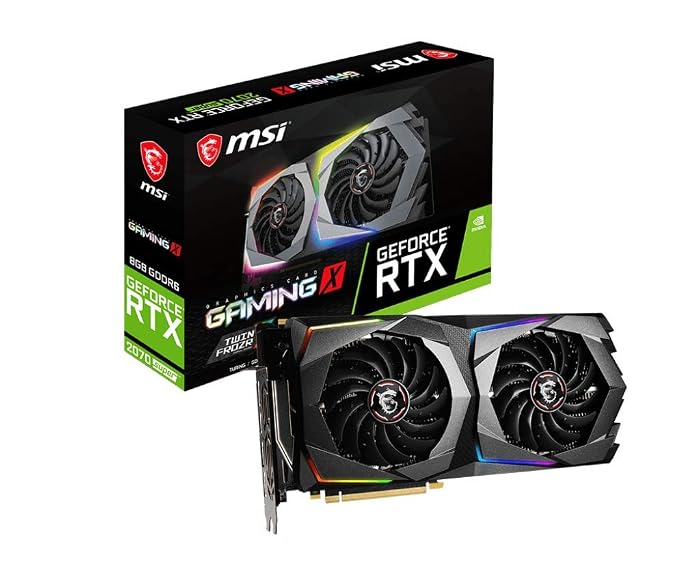
MSI RTX 2070 Super Gaming X
MSI
Very good
4.6 out of 5
Average of the Amazon buyer ratings — not a score from testing of our own
- Specs listed
- 12
- Section
- PC Components & Storage
Check price on Amazon We may earn a commission if you buy through this link.
As Amazon Associates, we earn from qualifying purchases. This means we may receive a small commission at no extra cost to you if you click through and make a purchase.
Selecting a dedicated graphics processing unit requires balancing architectural capabilities with daily workflow requirements. The MSI RTX 2070 Super Gaming X delivers a balanced graphical foundation designed for solid 1440p gaming performance and dependable creative multitasking. Based on NVIDIA Turing architecture, this desktop card provides 8GB of GDDR6 memory, an elevated factory core clock, and dedicated hardware units for modern visual computing workloads without demanding a complete system replacement.
For professionals evaluating legacy hardware stability alongside recreational fidelity, understanding the functional thresholds of this card is critical. This comprehensive guide reviews the foundational msi 2070 super specs, examines power delivery and enclosure space requirements, assesses acoustic thermal output, and contextualizes its modern utility against contemporary hardware to streamline your buying decision.


What You Get With the MSI RTX 2070 Super Gaming X
Unboxing this component provides the core hardware along with standard integration accessories intended for conventional desktop PC chassis setups.
In the box
- MSI RTX 2070 Super Gaming X graphics processing card
- Dual-fan Twin Frozr thermal management system pre-installed
- Dedicated 8GB GDDR6 memory subsystem with a 256-bit interface
- Assorted cables and connectors for power and integration
- Quick setup guide covering initial physical installation
- Triple DisplayPort 1.4 output connectors and one HDMI 2.0b interface
- Integrated NVLink edge connector for multi-GPU configurations
Key Specifications
| Graphics Coprocessor | NVIDIA GeForce RTX 2070 Super |
|---|---|
| Architecture | NVIDIA Turing |
| Boost Clock Speed | 1800 MHz |
| Video Memory | 8GB GDDR6 |
| Memory Interface Width | 256-Bit |
| Memory Clock Speed | 14000 MHz |
| Hardware Interface | PCI-Express x16 |
| Thermal Cooling Setup | Dual-Fan Twin Frozr System |
| Video Outputs | 3 x DisplayPort 1.4, 1 x HDMI 2.0b |
| Maximum Digital Resolution | 7680 x 4320 |
| Recommended Power Supply | 650 W |
| Physical Dimensions | 11.69 inches (L) x 5.63 inches (W) |
Figures as published by the manufacturer on the Amazon listing.
Thermal Dissipation and Twin Frozr Acoustic Management
Sustained graphics throughput depends heavily on consistent thermal dissipation, particularly when managing demanding software tasks over several continuous hours. The msi rtx 2070 super twin frozr cooling structure employs two large cooling fans paired with a dense heat sink array to pull thermal energy directly away from the central silicon die and onboard memory chips. By distributing airflow across the card length, the dual-fan arrangement keeps core operating temperatures within safe operational limits while preventing sudden clock throttling during heavy processing loops.
Acoustic performance remains a core priority for workspace professionals who cannot tolerate intrusive fan noise during focused business calls or audio production tasks. The dual-fan system operates dynamically based on operating loads, allowing the fans to scale down when executing basic operating system operations or standard office productivity suites. Even when rendering complex viewport previews or executing 3D visualization cycles, the cooling layout maintains manageable sound profiles compared to single-fan blower designs, making it suitable for quiet office environments.
Maintaining proper chassis airflow remains an essential prerequisite for optimizing this cooling architecture over extended service lifetimes. Because the card expels heat back into the computer case rather than venting directly out the rear I/O bracket, users should ensure their desktop enclosure contains adequate front intake and rear exhaust ventilation. Stable system airflow keeps the surrounding motherboard voltage regulation modules cool, complementing advanced motherboards like the msi meg x870e ace max when installed in custom workstation towers.
System Power Supply Requirements and Chassis Clearance
Before committing to an internal hardware component, verifying power delivery and enclosure space is critical to avoid integration delays. The official msi 2070 super power supply requirements dictate a recommended 650 W power supply unit to handle voltage fluctuations and overall desktop consumption. Users must ensure their existing desktop power unit provides dedicated supplementary power cables, as running high-performance graphics silicon on inadequate power delivery leads to sudden system reboots or stability crashes during intense rendering tasks.
Physical footprint is another vital engineering consideration for standard mid-tower and compact desktop chassis. The MSI RTX 2070 Super Gaming X measures 11.69 inches in length and 5.63 inches in width, requiring a generous horizontal clearance inside the enclosure. Builders must check that internal front-mounted liquid cooling radiators, drive cages, or reservoir brackets do not intrude upon the primary PCI-Express x16 slot pathway, ensuring the card locks securely into the retention bracket without bending.
Weight distribution and internal structural rigidity also deserve attention given the card substantial length. While the card includes standard mounting tabs, horizontal installation in standard cases can place stress on the PCIe slot over time if not seated carefully. Ensuring your case backplate is firmly screwed down prevents mechanical sag, providing a stable platform whether building a clean custom rig or upgrading existing prebuilt workstations such as the msi codex z2.
Display Connectivity and Multi-Monitor Productivity
Modern professional workflows frequently rely on expansive visual workspaces spanning multiple high-resolution monitors. The msi 2070 super displayport hdmi layout provides three DisplayPort 1.4 outputs alongside a single HDMI 2.0b connection, allowing the graphics board to drive up to four independent displays concurrently. This flexibility allows financial analysts, software developers, and video editors to spread timelines, terminal windows, and communication dashboards across a sprawling multi-panel array without requiring external adapter docks.
Visual output capability reaches a maximum digital resolution of 7680×4320, enabling support for modern ultra-high-definition and high-refresh-rate monitor panels. The card handles demanding modern productivity displays, including rapid refresh panels like the msi mag 271qpx, delivering crisp text rendering and fluid cursor movement through dedicated DisplayPort bandwidth. This high-density output ensures creative assets, architectural drawings, and video sequences maintain precise visual clarity across standard desktop viewing distances.
Connecting older secondary monitors is straightforward using standard passive display adapters, though the listing confirms native digital connections are modern DisplayPort and HDMI standards. The inclusion of HDMI 2.0b ensures broad compatibility with existing high-definition television panels, conference room projectors, and commercial presentations. Having three dedicated DisplayPort 1.4 sockets makes the hardware particularly appealing for mixed-media suites requiring color-calibrated panels alongside auxiliary status screens.
Sustained 1440p Gaming and Architectural Throughput
Evaluating real-world graphical throughput reveals strong capability for users targeting high-fidelity visuals at standard display targets. Utilizing the msi 2070 super for 1440p gaming allows players to achieve fluid motion and crisp detail across contemporary titles without relying on heavy graphical compromises. The Turing architecture incorporates specialized AI and dedicated Ray Tracing hardware units, delivering up to 25 percent faster performance than initial RTX 20-series chips and substantial speed advantages over older 10-series graphics products according to manufacturer specifications.
Core clock execution is driven by an out-of-the-box msi 2070 super boost clock reaching 1800 MHz, paired with 8GB of high-speed GDDR6 memory running on a 256-bit bus at 14000 MHz. This combination yields broad memory bandwidth necessary for rendering complex game textures, managing detailed geometry buffers, and streaming viewport assets without stutter. When analyzing any standard msi rtx 2070 super benchmark context, this hardware tier consistently demonstrates reliable frame pacing and minimal latency in standard desktop gaming environments.
In addition to traditional rasterized gaming workloads, the underlying Turing architecture supports software enhancement tools through GeForce Experience. These capabilities include driver optimization profiles, automated video and screenshot capture, and hardware-accelerated streaming encoders that offload recording burdens from the central processing unit. For professionals who balance video rendering workloads during the day and immersive gaming sessions at night, this architectural balance offers versatile media execution.
MSI RTX 2070 Super Gaming X Pros and Cons
Pros
- 1800 MHz factory boost clock
- Twin Frozr dual-fan thermal dissipation
- 8GB GDDR6 memory on 256-bit bus
- Triple DisplayPort 1.4 and HDMI connectivity
- Digital resolution support up to 7680×4320
- NVLink multi-GPU bridge compatibility
Cons
- Requires 650 W power supply capacity
- 69-inch length requires spacious enclosure
- 8GB VRAM limits ultra-heavy 4K assets
Check MSI RTX 2070 Super Gaming X on Amazon
Is the MSI RTX 2070 Super Gaming X Worth It
Determining whether the msi 2070 super is worth it requires assessing your specific computing requirements, monitor setup, and overall upgrade trajectory. For professionals operating a desktop with an aging graphics card who want immediate access to hardware-accelerated rendering and reliable 1440p gameplay, this component represents a practical hardware addition. Its dual-fan cooling keeps acoustics subdued, while the 650 W power ceiling aligns well with standard enterprise power supplies without requiring an expensive electrical overhaul.
However, users planning forward-looking systems dedicated to native 4K gaming, high-framerate visual simulation, or heavy machine learning workflows may encounter performance ceilings. The 8GB GDDR6 memory buffer and Turing processing core, while robust for 1440p production, will face capacity limitations in titles and applications optimized for wider memory structures. If your workflow involves intensive 3D scene compilation with massive texture packages, newer architectures with expanded VRAM capacity will provide a longer technological runway.
Ultimately, the msi 2070 super gaming x remains a dependable, quiet workhorse for general productivity, moderate video production, and high-detail 1440p entertainment. If your current PC case accommodates its 11.69-inch frame and your power supply satisfies the 650 W recommendation, this board offers a steady, functional upgrade path for productivity workstations.
Other Options to Consider
| Model | Buyer rating | Ratings | Why it is here |
|---|---|---|---|
 MSImsi Gaming GeForce RTX 2070 Super 8GB GDRR6 256-Bit HDMI/DP Nvlink Twin-Froze…Reviewed here MSImsi Gaming GeForce RTX 2070 Super 8GB GDRR6 256-Bit HDMI/DP Nvlink Twin-Froze…Reviewed here |
4.6Very good | — | The model reviewed on this page. View listing |
 ASUSASUS SFF-Ready Prime NVIDIA GeForce RTX™ 5070 OC Edition Graphics Card (PCIe®… ASUSASUS SFF-Ready Prime NVIDIA GeForce RTX™ 5070 OC Edition Graphics Card (PCIe®… |
4.7Excellent | 300 | ASUS SFF-Ready Prime NVIDIA GeForce suits builders assembling compact workstation towers who require modern PCIe 5.0 architecture, 12GB of cutting-edge GDDR7 memory, updated HDMI and DisplayPort 2.1 connectivity, a space-saving 2.5-slot profile, and a three-year warranty. View listing |
 GigabyteGIGABYTE Radeon RX 9070 XT Gaming OC 16G Graphics Card, PCIe 5.0,… GigabyteGIGABYTE Radeon RX 9070 XT Gaming OC 16G Graphics Card, PCIe 5.0,… |
4.6Very good | — | GIGABYTE Radeon RX 9070 XT fits creative professionals and gamers seeking an expanded 16GB GDDR6 memory buffer and PCIe 5.0 bus support, engineered with an extensive multi-fan Gaming OC cooling apparatus to manage high-resolution computational rendering. View listing |
 ASUSASUS TUF Gaming GeForce RTX™ 5080 16GB GDDR7 OC Edition Graphics Card ASUSASUS TUF Gaming GeForce RTX™ 5080 16GB GDDR7 OC Edition Graphics Card |
4.7Excellent | 270 | PCIe 5.0 targets high-end workstation users demanding enterprise-grade hardware longevity, featuring a massive 3.6-slot cooling profile, 16GB of GDDR7 memory, military-grade components, protective PCB coating, Axial-tech fans, and advanced DisplayPort 2.1 display support. View listing |
Ratings are the star averages left by Amazon buyers, not scores from our own testing. Prices are the ones on the listing when this page was written.
FAQ
What are the primary msi 2070 super specs to know?
The card features an NVIDIA GeForce RTX 2070 Super processor with an 1800 MHz boost clock, 8GB of GDDR6 memory operating on a 256-bit interface, and a 14000 MHz memory clock. It utilizes a PCIe x16 interface, dual cooling fans, and supports maximum digital resolutions up to 7680×4320.
What are the power requirements for this graphics card?
The manufacturer listing specifies a recommended 650 W desktop power supply unit to ensure stable voltage regulation under sustained compute and gaming workloads.
Does this graphics card support multiple monitors?
Yes, the board includes three DisplayPort 1.4 ports and one HDMI 2.0b port, allowing users to connect up to four concurrent digital displays for productive multitasking.
How large is the card inside a desktop computer case?
The card measures 11.69 inches in length and 5.63 inches in width, which requires checking internal chassis clearance to ensure it fits clear of front drive bays and cooling radiators.
Does the card support NVLink multi-GPU setups?
Yes, the listing confirms that this model includes NVLink hardware support, allowing compatible systems to bridge multiple matching graphics processors for expanded processing tasks.
More PC Components & Storage ratings
See the section
SanDisk Professional PRO-G40 SSD: The Professional Workflow Verdict
Production teams handling intensive data pipelines cannot afford storage bottlenecks that slow down media offloads or risk hardware failure on location. The SanDisk Professional…

Samsung 870 QVO Review: The Practical Choice for High-Capacity Storage
For IT professionals, creative specialists, and desktop enthusiasts who need expansive storage capacity without consuming expensive NVMe slots, the Samsung 870 QVO delivers an…
Buyer favourite 4.5+ stars from 500 or more ratings
Intel Core i5-3330 Assessment: A Practical Choice for Legacy Rigs
Navigating hardware maintenance for older desktop fleets often requires balancing immediate utility against replacement overhead, which brings the Intel Core i5-3330 into focus for…

Synology DS225+ NAS: A Concise Evaluation for Professionals
Selecting the ideal network-attached storage solution for a home office or creative studio requires balancing data redundancy, software ease, and ongoing operating stability. The…

Intel Pentium Gold G5400: A Pragmatic Look for Office Builds
Building a dependable desktop for business administration requires understanding where entry-tier processors fit into routine commercial workflows. If you need a straightforward processor to…
Get new ratings by email
A weekly digest of the products added to the ratings pages.