Logitech M170 Review: A Decisive Buying Guide for Busy Professionals
The Logitech M170 is engineered for busy professionals who require prompt, dependable computer navigation without battling intricate pairing procedures, driver bloat, or delicate exterior hardware. If your daily workflow centers on a…
By Nicole Bellamy 9 min read

Logitech M170
Logitech
Very good
Our score: 9.0/10
Scores are out of 10, based on listed specifications and buyer feedback.
- Specs listed
- 11
- Section
- Accessories & Peripherals
Buyer favourite Scored 9.0/10 or higher
Check price on Amazon We may earn a commission if you buy through this link.
As Amazon Associates, we earn from qualifying purchases. This means we may receive a small commission at no extra cost to you if you click through and make a purchase.
The Logitech M170 is engineered for busy professionals who require prompt, dependable computer navigation without battling intricate pairing procedures, driver bloat, or delicate exterior hardware. If your daily workflow centers on a portable laptop setup, a flexible hot desk, or a shared office workstation, this compact black peripheral delivers reliable tracking right from the start. Built around a symmetrical ambidextrous shell and a pre-paired radio frequency dongle, it sidesteps the handshake latency and dropouts that frequently compromise entry-level Bluetooth mice. Users can count on predictable line-by-line scrolling, crisp tactile switches, and immediate cross-platform utility across modern computing setups.
This comprehensive review analyzes the performance, construction, and practical trade-offs of the peripheral to help you decide whether it fits your professional toolkit. In the sections below, we inspect the hardware components included in the retail box, review the complete technical specifications, assess the rapid three-second setup across major operating systems, and evaluate real-world tracking accuracy. We also explore battery preservation over months of continuous business use, evaluate the overall ownership value, and compare sensible alternatives to help you choose the best pointing device for your daily routine.
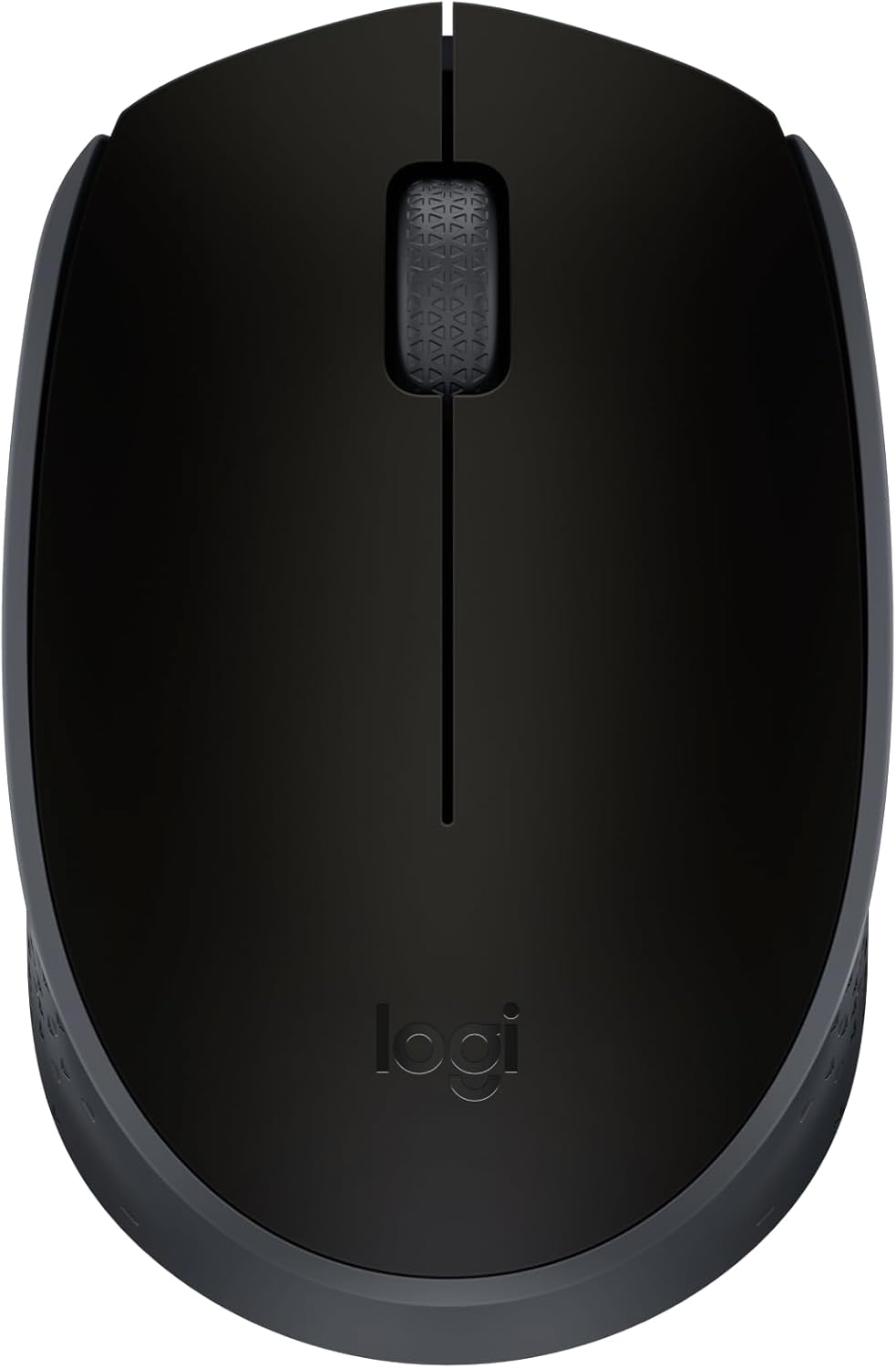


What You Get With the Logitech M170
Logitech keeps the unboxing experience clean and functional, supplying only the vital hardware needed to establish an immediate workstation connection. The package contains no wasteful accessories, eliminating the need for separate charging cables or supplementary software downloads before you begin working:
In the box
- Logitech M170 wireless mouse in matte black
- Pre-installed or bundled AA alkaline battery delivering up to 12 months of operation
- Compact 2.4 GHz USB mini receiver stored inside or along with the mouse body
- Integrated two-button interface with a central mechanical line-by-line scroll wheel
- Certified post-consumer recycled plastic housing incorporating a minimum of 59 percent recycled material
- Optical tracking sensor calibrated to a fixed 800 DPI resolution
- Essential regulatory and hardware setup documentation
Key Specifications
| Product Model | Logitech M170 |
|---|---|
| Connectivity | 2.4 GHz Wireless via USB Mini Receiver |
| Wireless Operating Range | Up to 33 feet (10 meters) |
| Tracking Technology | Optical Tracking |
| Sensor Sensitivity | 800 DPI maximum |
| Button Configuration | 2 Buttons plus Scroll Wheel |
| Dimensions | 3.8 x 2.4 x 1.4 inches (97.7 x 61.5 x 35.2 mm) |
| Weight with Battery | 2.49 oz (79.5 g) |
| Power Configuration | 1 x AA Battery (Included in package) |
| Battery Longevity | Up to 12 months with integrated auto-sleep |
| Platform Compatibility | Windows 11, macOS 14 Sonoma, ChromeOS 137, Linux Ubuntu 24.04, iPadOS, Android 14.0 |
All 33 attributes from the listing
| Connectivity Technology | USB |
|---|---|
| Additional Features | Wireless |
| Movement Detection | Optical |
| Button Quantity | 1 |
| Hand Orientation | Ambidextrous |
| Compatible Devices | Windows ® , Mac, Chrome |
| Battery Average Life | 1 years |
| Number of Batteries | 1 AA batteries required. (included) |
| Hardware Platform | Laptop, PC |
| Power Source | Battery Powered |
| Mouse Maximum Sensitivity | 800 dots per inch |
| Range | 33.0 feet |
| Color | Black |
| Style Name | Pack of 1 |
| Pattern | Floral |
| Enclosure Material | Plastic |
| Brand | Logitech |
| Model Name | Logitech M170 Mouse |
| Antenna Location | Personal |
| Model Number | 910-004940 |
| Manufacturer | Logitech |
| UPC | 097855124180 |
| Global Trade Identification Number | 00097855124180 |
| Item Type Name | Logitech M170 Mouse |
| Mfr Part Number | 910-004940 |
| Warranty Description | Manufacturer’s warranty can be requested from customer service. |
| Best Sellers Rank | #45 in Computer Mice |
| ASIN | B074L9L5KZ |
| Item Weight | 70 g |
| Item Dimensions L x W | 3.86"L x 2.44"W |
| Unit Count | 1 Count |
| Special Feature | Wireless |
| Movement Detection Technology | Optical |
Figures as published by the manufacturer on the Amazon listing.
Setup and Operating System Compatibility
The physical Logitech M170 setup routine is centered on effortless deployment, demanding no complex technical intervention. Connecting the mouse takes approximately three seconds, a speed confirmed by manufacturer testing conducted with 50 participants in Switzerland in 2022. Users simply slide open the battery hatch, ensure the AA cell is active, pull out the compact Logitech M170 USB receiver, and plug it into an available port. The host computer registers the peripheral immediately, avoiding cumbersome setup wizards, background driver downloads, or proprietary utility suites that consume system memory.
Extensive cross-platform support stands out as one of the device’s greatest assets for mixed-device enterprise environments. In addition to running smoothly on Windows 11 machines, verified Logitech M170 Mac compatibility guarantees seamless tracking on systems running macOS 14 Sonoma. The device also supports ChromeOS 137, Linux Ubuntu 24.04 Noble Numbat, iPadOS, and Android 14.0. For operators who transition between an expansive desktop installation like the signature slim combo mk955 and a mobile setup, having a mouse that operates universally across platforms without manual reconfiguration preserves precious work time.
The included USB mini receiver utilizes a standard USB Type-A connector, which ensures a reliable physical connection but requires careful planning for ultrabook users. The product listing specifies that the USB receiver is provided inside or along with the mouse, offering a secure internal slot that keeps the dongle safely stored during commutes. However, users operating thin laptops or MacBooks featuring only USB-C ports will need a standard external hub or adapter. Once plugged in, the radio frequency hardware maintains an unbroken connection, dodging the signal drops often seen in crowded office spaces where competing Bluetooth signals cause interference.
Everyday Optical Tracking and Ergonomic Handling
Consistent daily output demands reliable cursor navigation, and the integrated Logitech M170 optical tracking sensor provides steady responsiveness across everyday office surfaces. Tuned to a static sensitivity of 800 DPI, the sensor is calibrated specifically for general administrative duties, spreadsheets, document processing, and browser multitasking. Rather than acting like overly sensitive gaming sensors that demand specialized surfaces, this optical system tracks cleanly on wood, laminate desks, and mouse pads. Line-by-line scrolling through the integrated center wheel adds precise mechanical control, preventing sudden jumps when reviewing dense balance sheets or lengthy legal briefs.
Ergonomic handling is governed by a symmetrical chassis that makes this a true Logitech M170 ambidextrous mouse. Measuring 3.8 inches long, 2.4 inches wide, and 1.4 inches tall, the curved profile naturally accommodates either hand with equal comfort. While specialized portable gaming models like the razer orochi v2 offer asymmetric thumb rests and high-speed sensors, the M170 sticks to a balanced shape that any colleague can pick up and use instantly. The gently sculpted sides give fingertips a secure grip, ensuring steady control without straining your hand during extended work sessions.
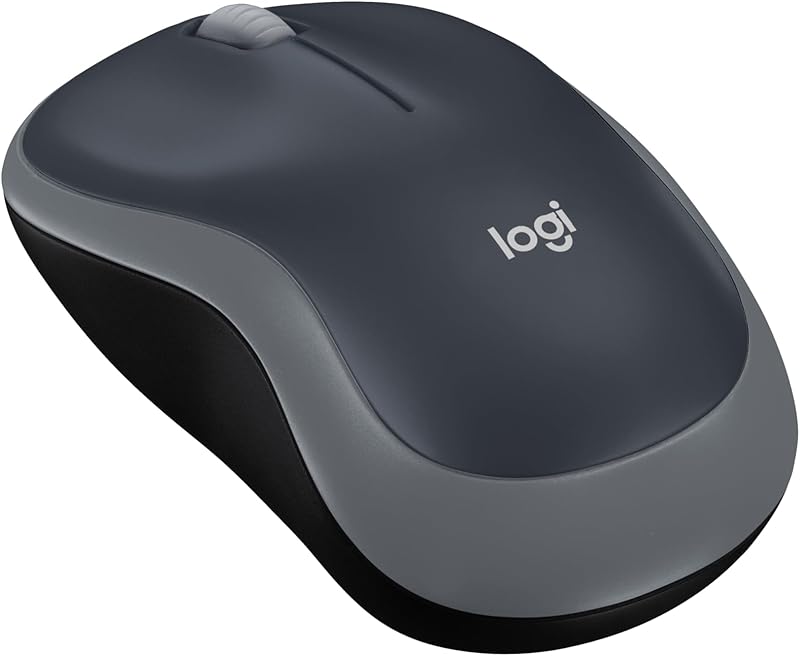
The mouse pairs structural durability with a lightweight travel profile, registering an approximate weight of just 2.49 ounces (79.5 grams) with the AA battery installed. Built using durable plastic, the housing includes certified post-consumer recycled plastic, delivering a minimum of 59 percent recycled material in the black model. This conscious design achieves a verified product carbon footprint of 4.05 kg CO2e. The exterior matte plastic resists hand oils and minor abrasions, enabling the unit to withstand being packed into a briefcase or travel bag without suffering structural wear.
Battery Efficiency and Mobile Workflow Performance
Long-term power reliability is driven by the impressive Logitech M170 battery life, which delivers up to 12 months of operational uptime from a single standard AA battery. An intelligent auto-sleep mode preserves power by putting the circuitry into an idle state whenever the mouse sits untouched on the desk. This power-saving design eliminates the frustration of arriving at a Monday morning presentation only to discover a drained battery. The moment you move the mouse or press a button, the optical sensor reactivates immediately, letting you resume work without fiddling with manual power switches.
Wireless stability is anchored by the Logitech M170 2.4 GHz radio frequency connection, which delivers an operating distance of up to 33 feet (10 meters) from the host machine. This broad operating range makes the mouse an effective presentation remote during meetings, enabling you to step away from your desk to change slides or control media across a conference room. The robust 2.4 GHz signal easily handles high-density corporate environments, maintaining smooth tracking without latency or dropped inputs caused by nearby office tech.
For mobile professionals, packing the Logitech M170 for laptop work provides a distinct upgrade over restrictive laptop trackpads without cluttering your carry-on luggage. Advanced configurable mice like the attack shark r3 cater to enthusiasts who want customizable polling rates and modular shells, but the M170 is purpose-built for fuss-free productivity that requires no charging docks or cables. Swapping out an exhausted AA battery after a full year takes only seconds, making standard alkaline power an asset for frequent travelers who cannot afford to pause their work for a battery recharge.
Logitech M170 Pros and Cons
Pros
- Three-second plug-and-play USB setup
- Up to 12-month battery life with auto-sleep
- Symmetrical ambidextrous shape for either hand
- Broad multi-platform operating system compatibility
- Lightweight build under 80 grams with battery
Cons
- Fixed 800 DPI optical tracking sensitivity
- Requires USB-A port without native Bluetooth
- Compact chassis less supportive for large hands
Is the Logitech M170 Worth It
Evaluating whether the Logitech M170 represents a practical purchase comes down to your personal workflow needs and your preference for plug-and-play simplicity. For corporate travelers, remote staff, students, and IT procurement teams seeking dependable hardware for an entire department, this mouse delivers outstanding value through robust construction and instant connectivity. It handles the core mechanics of daily computer navigation without inflating complexity with features that standard business software simply does not require.
The device is particularly suitable for professionals who want a compact mouse that stows neatly in any pocket, requires zero driver maintenance, and pairs reliably with Windows, macOS, Linux, and ChromeOS hardware. Left-handed users benefit directly from the symmetrical contouring, while mobile workers will appreciate the convenience of a single AA battery that lasts up to a year. If your day-to-day workload consists primarily of spreadsheets, emails, writing, and browser-based software, this peripheral easily meets those demands.
However, professionals with larger hands who prefer a full palm grip during marathon work sessions may find the 3.8-inch chassis somewhat undersized over eight-hour days. Furthermore, creative specialists who need on-the-fly DPI switching, horizontal thumb wheels, or customizable macro buttons will quickly outgrow the fixed 800 DPI tracking and standard two-button layout. For power users with those specialized requirements, exploring higher-tier productivity gear makes sense, but for dependable daily mobile computing, this mouse remains an exceptionally reliable choice.
Other Options to Consider
| Model | Our score | Why it is here |
|---|---|---|
 LogitechLogitech M170 Compact Ambidextrous 2.4 GHz Wireless Mouse – BlackReviewed here LogitechLogitech M170 Compact Ambidextrous 2.4 GHz Wireless Mouse – BlackReviewed here |
9.0/10Very good | The model reviewed on this page. View listing |
 LogitechLogitech M185 Compact Ambidextrous 2.4 GHz Wireless Mouse – Swift Grey LogitechLogitech M185 Compact Ambidextrous 2.4 GHz Wireless Mouse – Swift Grey |
8.8/10Very good | Ambidextrous mouse with 2.4 GHz is a practical alternative featuring a USB-A nano receiver, optical tracking, 12-month battery life, and complete compatibility with PC, Mac, and laptop systems in a Swift Grey finish, making it an excellent match for professionals who want an identical plug-and-play layout with a two-tone appearance. View listing |
 ElecomELECOM BITRA Wireless Trackball Mouse, Bluetooth and USB 2.4GHz Switch, Silent Click,… ElecomELECOM BITRA Wireless Trackball Mouse, Bluetooth and USB 2.4GHz Switch, Silent Click,… |
8.2/10Good | ELECOM BITRA Wireless Trackball Mouse is tailored for mobile professionals working in tight travel environments like airplane tray tables, offering dual Bluetooth and 2.4 GHz wireless connectivity, silent click buttons, a compact index-finger layout, and a 34mm trackball that eliminates the need to push a mouse across a flat surface. View listing |
 LogitechLogitech M240 Compact Silent Bluetooth Wireless Mouse – Graphite LogitechLogitech M240 Compact Silent Bluetooth Wireless Mouse – Graphite |
8.8/10Very good | Bluetooth connectivity offers a streamlined cordless solution for users operating modern ultrabooks without standard USB-A ports, delivering direct Bluetooth pairing without any USB receiver, quiet clicks, three non-customizable buttons, and an 18-month battery life for PC and Mac users in a Graphite enclosure. View listing |
Scores are out of 10, based on listed specifications and buyer feedback. Prices are the ones on the listing when this page was written.
FAQ
How does the Logitech M170 connect to a computer?
The mouse pairs via a 2.4 GHz radio frequency USB mini receiver that connects to any available USB port on your PC, Mac, or laptop. The hardware establishes a link within approximately three seconds, providing immediate tracking without requiring software downloads or Bluetooth pairing steps.
What battery type does the Logitech M170 use, and how long does it last?
The peripheral runs on a single AA alkaline battery, which comes pre-packaged with the device. Thanks to energy-saving circuitry and an integrated auto-sleep function that activates during downtime, the battery provides up to 12 months of standard daily use before needing replacement.
Does the Logitech M170 support Apple Mac systems?
Yes, the mouse provides broad compatibility with Apple hardware running macOS, including confirmed support for Mac OS 14 Sonoma. Your Mac must have a standard USB Type-A port or an appropriate adapter to accept the included wireless USB mini receiver.
Is the Logitech M170 suitable for left-handed users?
Yes, the device features a symmetrical, ambidextrous shell measuring 3.8 inches long and 2.4 inches wide. This balanced profile allows either hand to rest naturally on the mouse while maintaining equal access to the primary buttons and central scroll wheel.
Can you adjust the tracking sensitivity on the Logitech M170?
No, the mouse uses an optical tracking sensor calibrated to a fixed maximum sensitivity of 800 DPI. This setting is intentionally optimized for smooth, controlled line-by-line scrolling and accurate document navigation across everyday desktop surfaces rather than rapid gaming adjustments.
Where is the USB mini receiver stored during transit?
The wireless USB mini receiver is designed to be stored inside or alongside the mouse chassis. This dedicated internal storage compartment keeps the transceiver secure while traveling, preventing you from misplacing the connector between meetings or during flights.
More Accessories & Peripherals ratings
See the section
TotalMount PS5 Wall Mount Review: A Minimalist Gaming Setup
A cluttered entertainment center detracts from an organized home office or living area. If you recently mounted a television to clean up floor space,…
Buyer favourite Scored 9.0+/10

Epson EcoTank ET-2720: A Decisive Look at Everyday Office Efficiency
Busy professionals balancing document output against recurring operational overhead need a clear verdict on whether a tank-based unit makes practical sense for daily work.…

ASUS ROG Azoth Extreme: Decisive Review for Professionals
Shoppers evaluating high-end mechanical peripherals frequently ask whether flagship construction justifies the investment, especially when looking into the ASUS ROG Azoth Extreme. Designed to…

adidas Prime 7 Backpack: The 37L Commuter and Travel Verdict
The adidas Prime 7 Backpack is designed for commuters, students, and active professionals who must haul high-volume cargo without splitting their gear between multiple…

ASUS ROG Strix Scope RX: Optical Speed Meets Rugged Durability
The ASUS ROG Strix Scope RX is engineered for professionals and gamers who require rapid input response combined with exceptional physical resilience. If you…
Buyer favourite Scored 9.0+/10
Get new ratings by email
A weekly digest of the products added to the ratings pages.