Lenovo Idea Tab Assessment: Decisive Upgrade for Everyday Work
If you are still relying on an older Android slate like the aging Lenovo Tab 4, your daily workflow has likely outgrown the sluggish processing, low-resolution screen, and lack of active stylus…
By Marcus Osborne 9 min read

Lenovo Idea Tab
Lenovo
Good
4.2 out of 5
Average of the Amazon buyer ratings — not a score from testing of our own
- Specs listed
- 10
- Section
- Phones & Tablets
Check price on Amazon We may earn a commission if you buy through this link.
As Amazon Associates, we earn from qualifying purchases. This means we may receive a small commission at no extra cost to you if you click through and make a purchase.
If you are still relying on an older Android slate like the aging Lenovo Tab 4, your daily workflow has likely outgrown the sluggish processing, low-resolution screen, and lack of active stylus support that defined earlier budget hardware. Modern professional tasks require fast document markup, seamless cloud synchronization, and responsive split-screen operation for multitasking between emails and research materials. Upgrading to the Lenovo Idea Tab represents a major generational jump, delivering modern hardware ergonomics, an active digital pen, and an included folio stand in a single business-ready bundle.
This Lenovo Idea Tab review examines how the device handles daily productivity demands, evaluating whether its updated processor, high-resolution panel, and integrated software ecosystem provide enough value for busy professionals seeking a portable auxiliary workstation. We analyze display fidelity, stylus response, hardware performance ceilings, and battery longevity so you can make a decisive buying decision without sifting through marketing noise.


What You Get With the Lenovo Idea Tab
The retail package is assembled as an all-in-one productivity kit, eliminating the need to purchase essential accessories separately before getting to work.
In the box
- Lenovo Idea Tab 11-inch tablet (1st Generation, 2025 release, model ZAFR0925US)
- Lenovo Tab Pen with low-latency digital handwriting and sketching support
- Protective folio case with an integrated multi-angle viewing and typing stand
- 20W AC power adapter for rapid charging
- USB-C 2.0 charging and data cable
- MicroSD card tray for expandable storage
- Quick Start Guide, safety documentation, and 1-year limited parts and labor warranty
- Pre-installed learning and workflow applications: Lenovo AI Note, Squid, Nebo, and MyScript Calculator
- Integrated Smart Connect software and Circle to Search with Google functionality
Key Specifications
| Screen Size and Type | 11.0-inch IPS touchscreen display |
|---|---|
| Screen Resolution and Refresh | 2.5K resolution, 90Hz refresh rate, 72% NTSC, TÜV Rheinland Low Blue Light |
| Main Processor | MediaTek Dimensity 6300 octa-core processor |
| Graphics Hardware | Integrated Arm Mali-G57 MC2 GPU |
| Operating Memory | 4 GB RAM |
| Local Storage | 128 GB ROM (expandable via MicroSD card tray) |
| Audio Hardware | Quad speakers with Dolby Atmos tuning |
| Battery and Charging | Up to 12 hours video playback; 20W wired charging via USB-C 2.0 |
| Bundled Accessories | Lenovo Tab Pen and multi-position protective folio case |
| Connectivity Ecosystem | Smart Connect cross-device sharing, Circle to Search with Google |
All 58 attributes from the listing
| Brand | Lenovo |
|---|---|
| Model Name | Idea Tab |
| Generation | 1st Generation |
| Model Year | 2025 |
| Included Components | Tablet, Quick Start Guide & Safety, Warranty, MicroSD Card Tray, USB-C 2.0 Charging Cable, Lenovo Tab Pen, and Folio Case. |
| Warranty Description | 1 Year Limited Parts & Labor |
| Model Number | ZAFR0925US |
| Specific Uses For Product | Student |
| UPC | 199271882306 |
| Number of Items | 1 |
| Style Name | Lenovo Idea Tab |
| Manufacturer | Lenovo |
| Number of Packs | 1 |
| Set Name | Idea Tab |
| Configuration | 11" 2.5K IPS Touchscreen Display – 90Hz – MediaTek Dimensity 6300 – 4 GB Memory – 128 GB Storage – Tab Pen and Folio Case |
| Unit Count | 1 Count |
| Size | 11" with Tab Pen and Folio Case |
| Model Series | Idea Tab |
| Mfr Part Number | ZAFR0925US |
| Best Sellers Rank | #1,141 in Electronics (See Top 100 in Electronics) #27 in Computer Tablets |
| ASIN | B0FGYCJ7NJ |
| Battery Average Life | 12 hours |
| Battery Capacity | 7216 milliamp hours |
| Battery Cell Type | Lithium Polymer |
| Lithium-Battery Energy Content | 26.7 watt-hours |
| Processor Speed | 2.4 GHz |
| Processor Description | MediaTek Dimensity 6300 |
| Processor Brand | MediaTek |
| CPU Model Number | 6300 |
| Operating System | Android 15 |
| Color | Luna Gray |
| Item Weight | 1.1 pounds |
| Item Dimensions L x W x Thickness | 6.54"L x 10.02"W x 0.28"Th |
| Human-Interface Input | Touchscreen with Stylus Support |
| Graphics Description | Integrated |
| Compatible Devices | Stylus |
| Warranty Type | Limited |
| Software Update Supported to Date | unknown |
| Operating System Family | Android |
| Screen Size | 11 inches |
| Display Resolution Maximum | 2560 x 1600 |
| Display Type | LCD |
| Native Resolution | 2560 x 1600 pixels |
| Aspect Ratio | 4:3 |
| Maximum Display Brightness | 500 nit |
| Display Refresh Rate in Hertz | 90 |
| Memory Storage Capacity | 4 GB |
| RAM Memory Installed | 128 GB |
| Compatible Flash Memory Type | microSD |
| RAM Size | 128 GB |
| Hard-Drive Size | 128 GB |
| Hardware Interface | Bluetooth |
| Wireless Technology | Bluetooth, Wi-Fi |
| Cellular Technology | WIFI |
| Connectivity Technology | Bluetooth, Wi-Fi |
| Wireless Compability | 802.11ax |
| Video Capture Resolution | HD 720p |
| Other Special Features of the Product | Stereo Speakers |
Figures as published by the manufacturer on the Amazon listing.
Display Quality and Screen Utility
The primary attraction of this hardware refresh is the 11-inch 2.5K panel, which outclasses older entries like the Tab 4 series and even modern baseline slates such as the lenovo tablet m11. Upgrading to a 2.5K resolution delivers crisp text rendering and sharp tabular details, which prevents the pixelation and blurred fonts common on entry-level budget panels. When cross-referencing dense spreadsheets or reviewing multi-page contracts, the increased pixel density allows you to read small type without constantly zooming in and out.
Fluidity is noticeably enhanced by the 90Hz refresh rate, making document scrolling, app switching, and stylus interaction appear significantly smoother than standard 60Hz screens. The display features a 72% NTSC color gamut, which is tuned primarily for clarity, standard office assets, and video conferences rather than high-end color grading. While digital artists needing full DCI-P3 coverage will want dedicated design monitors, business users will find the balance clean, legible, and visually balanced for daily administration.
Eye comfort is a practical concern for anyone staring at glass screens for eight hours a day. The Lenovo Idea Tab display integrates TÜV Rheinland Low Blue Light hardware solutions, filtering out harsher blue wavelengths at the hardware level without severely tinting the image orange. This engineering helps minimize eye strain during extended evening review sessions, maintaining a comfortable reading surface whether you are marking up project briefs or working through queued correspondence.
Stylus Input and Built-In Productivity Tools
A major justification for choosing this bundle over older hardware is the included active stylus. The Lenovo Tab Pen offers low-latency input that registers rapid pen strokes, note-taking, and PDF marginalia without the disconnected lag that plagued earlier generations. For professionals who prefer handwriting during remote meetings or clients signing agreements on-site, the pen functions as a natural extension of the interface rather than an awkward aftermarket pointer.
Lenovo differentiates this hardware by pre-installing a focused software suite rather than leaving users to search for compatible productivity tools. The system includes Nebo, Squid, and MyScript Calculator, allowing you to convert handwritten equations, organize unstructured brainstorms, and export structured digital notes immediately. In addition, Lenovo AI Note is built into the operating environment to help summarize lengthy transcripts, rephrase rough meeting notes, and structure disorganized bullet points during intensive working sessions.
Workflow navigation is further streamlined through Circle to Search with Google. By circling any image, foreign phrase, or reference term on screen using the Lenovo Tab Pen or your finger, the system executes an instant contextual search or translation without forcing you to switch active windows or copy text manually. Combined with the included folio case that props the tablet into upright viewing and typing angles, the machine serves as a dedicated secondary workspace next to your main office terminal.
Processing Performance and Memory Headroom
The core computing engine is the MediaTek Dimensity 6300 octa-core chip paired with an Arm Mali-G57 MC2 graphics processor. For users migrating from older tablets like the Tab 4, the difference in responsiveness is immediately obvious. Operating system navigation is prompt, apps launch without prolonged pauses, and cloud-based platforms like Google Workspace or Microsoft 365 sync cleanly. If you need a more media-centric form factor with built-in cylindrical grips, alternatives like the yoga tab 11 exist, but the Idea Tab focuses entirely on a conventional slate layout optimized for general business tasks.
The main bottleneck to consider is the 4 GB memory ceiling. While modern mobile software is adept at memory compression, 4 GB of RAM is strictly intended for modest multitasking. Running two split-screen applications—such as a PDF viewer alongside an email draft—operates reliably, but keeping dozens of heavy browser tabs open simultaneously alongside background communication tools will eventually cause background apps to reload. Professionals must treat this slate as an agile communication and document viewer rather than a heavy workstation replacement.
Local storage is generous at 128 GB, giving users ample room for locally cached documents, presentations, offline video files, and application data. If your workflow requires retaining massive archival folders or large training media, the built-in MicroSD card tray ensures straightforward storage expansion. The Dimensity 6300 chip delivers stable thermals during prolonged use, keeping the chassis cool without aggressive thermal throttling.
Battery Longevity and Charging Efficiency
Battery stamina is a critical metric for traveling professionals who cannot constantly seek wall outlets between airport gates or meeting rooms. The listing specifies all-day battery life, capable of reaching up to 12 hours of continuous video streaming over YouTube. In practical office environments involving mixed document editing, intermittent stylus markup, web browsing, and active Wi-Fi sync, users can realistically expect reliable full-day operation on a single charge cycle.
When the internal cell runs low, the bundled 20W charger provides a quick return to service via the USB-C port. Rapid power delivery minimizes downtime, ensuring an hour plugged in provides substantial operational runtime. However, buyers should take note of the hardware interface: the charging port utilizes the USB 2.0 specification. While perfectly adequate for power delivery and routine file syncing, it will not support high-speed external monitor video-out or multi-gigabit wired file transfers to external solid-state drives.
For cross-device management, Lenovo incorporates Smart Connect software to facilitate easier wireless file handoffs between compatible digital devices without hunting for cables. While it does not turn the tablet into an enterprise compute terminal like a dedicated lenovo thinkpad l14, it provides sufficient hardware endurance and wireless flexibility to handle all auxiliary administrative duties during a full working day away from the desk.
Lenovo Idea Tab Pros and Cons
Pros
- Sharp 11-inch 2.5K IPS display with 90Hz refresh
- Bundled low-latency Lenovo Tab Pen and folio case
- Pre-installed productivity suite with Lenovo AI Note
- All-day battery life with 20W fast charging
- Quad Dolby Atmos speakers for clear audio
- Expandable storage via integrated MicroSD card tray
Cons
- 4 GB memory limits intensive background multitasking
- USB-C port restricted to older USB 2.0 speeds
- Color gamut capped at 72 percent NTSC
Check Lenovo Idea Tab on Amazon
Is the Lenovo Idea Tab Worth It
The Lenovo Idea Tab is worth it for professionals, field workers, and remote operators seeking an affordable, all-inclusive secondary slate to replace sluggish, end-of-life hardware. By bundling the tablet, an active stylus, and a folio stand into a single package, it eliminates peripheral guesswork and provides a ready-made digital notebook. The 2.5K 90Hz display and low-blue-light certification provide an excellent visual surface for reading contracts, reviewing technical documents, and attending video briefings.
However, this tablet is not designed for demanding power users. Those requiring heavy desktop-grade multitasking, virtual machine environments, 4K video editing, or heavy CAD drafting will run up against the limits of the 4 GB RAM configuration and USB 2.0 data transfer speeds. For high-demand computing, an enterprise laptop remains a necessity, leaving this tablet in the role of a companion reader and note-taking pad.
If your daily routine revolves around signing paperwork, annotating briefs, checking emails on the go, and taking advantage of stylus-driven AI notes, the Lenovo Idea Tab offers a practical, modern upgrade over dated legacy slates. It hits the right functional notes without requiring an enterprise-tier financial investment.
Other Options to Consider
| Model | Buyer rating | Ratings | Why it is here |
|---|---|---|---|
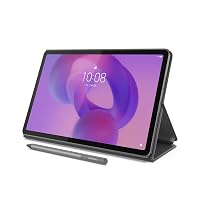 LenovoLenovo Idea Tab – College Tablet – 11″ 2.5K IPS Touchscreen Display…Reviewed here LenovoLenovo Idea Tab – College Tablet – 11″ 2.5K IPS Touchscreen Display…Reviewed here |
4.2Good | — | The model reviewed on this page. View listing |
 AmazonAmazon Fire HD 10 tablet, built for relaxation, 10.1" vibrant Full HD… AmazonAmazon Fire HD 10 tablet, built for relaxation, 10.1" vibrant Full HD… |
4.5Very good | 44,306 | Amazon Fire HD 10 tablet suits buyers who want a pure media consumption device with an octa-core chip and 10.1-inch Full HD screen, but who do not need active digital pen input or open productivity bundles. View listing |
 OukitelRT9 Rugged Tablet 11000mAh Battery 10.1”FHD Display Android Tablet OukitelRT9 Rugged Tablet 11000mAh Battery 10.1”FHD Display Android Tablet |
4.2Good | — | 24GB RAM 256GB ROM appeals to field technicians and industrial workers who need a rugged, waterproof, drop-proof chassis with a massive 11,000mAh battery and dual-SIM support rather than a sleek office-styled tablet bundle. View listing |
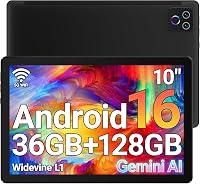 URAO FlagshipURAO Tablet,10.1" Android 16 Tablet Octa-core 36GB+128GB Dual Camera URAO FlagshipURAO Tablet,10.1" Android 16 Tablet Octa-core 36GB+128GB Dual Camera |
4.5Very good | 67 | 1280×800 IPS HD Touchscreen 6000mAh fits basic users who only require lightweight Wi-Fi 6 web browsing and modest app interaction on a lower-resolution 10.1-inch screen without needing high-resolution document sharpness or specialized stylus software. View listing |
Ratings are the star averages left by Amazon buyers, not scores from our own testing. Prices are the ones on the listing when this page was written.
FAQ
How does the Lenovo Idea Tab compare to the older Lenovo Tab 4?
The Idea Tab is a generational leap forward over the older Tab 4 models. It upgrades the screen from low-density 800p or 1080p resolution to a 2.5K 90Hz panel, replaces outdated micro-USB with modern USB-C 20W charging, integrates a faster MediaTek Dimensity 6300 chip, and includes active stylus input with the Lenovo Tab Pen and folio case straight out of the box.
Are the stylus and folio case included in the retail box?
Yes. The listing specifically includes both the Lenovo Tab Pen and the protective folio case as standard components inside the packaging, alongside the 20W charger, USB-C cable, and MicroSD card tray tool.
Can you expand the internal storage on this tablet?
Yes. The Lenovo Idea Tab comes equipped with 128 GB of internal storage and includes a dedicated MicroSD card tray, enabling straightforward memory expansion for users carrying extensive offline document archives or media libraries.
Is 4 GB of RAM enough for daily business tasks?
The 4 GB memory allocation is adequate for single-task workflows, side-by-side split-screen note-taking, video calls, and standard web browsing. However, it will restrict performance if you attempt to leave dozens of resource-heavy browser tabs open simultaneously or rapidly switch between heavy enterprise suites.
Does the display cause eye strain during long working sessions?
The 11-inch 2.5K IPS screen incorporates TÜV Rheinland Low Blue Light hardware solutions. This filters out harsh blue light spectrums directly at the hardware layer, helping to prevent digital eye fatigue without severely distorting the screen colors during extended reading sessions.
More Phones & Tablets ratings
See the section
Apple iPad Air 7 Review: Desktop-Class M4 Speed for Agile Workflows
Corporate executives and mobile professionals seeking an ultra-portable workstation frequently face a compromise between heavy clamshell laptops and underpowered media slates. The Apple iPad…
Buyer favourite 4.5+ stars from 500 or more ratings

Lenovo Yoga Tab 11: Decisive Breakdown for Busy Buyers
For busy professionals shopping for a dedicated desk companion or travel screen, selecting the right secondary device comes down to utility, form factor, and…
Microsoft Surface Pro 9 Tablet: The Concise Executive Review
The Microsoft Surface Pro 9 is designed for mobile executives, consultants, and business professionals who require full desktop software functionality within an ultra-portable hardware…
Apple iPad Air 11-inch: Mobile Workhorse or Unnecessary Upgrade?
For professionals seeking a streamlined digital setup, the Apple iPad Air 11-inch offers an intriguing balance of portable computing power and premium hardware design.…
Buyer favourite 4.5+ stars from 500 or more ratings
Get new ratings by email
A weekly digest of the products added to the ratings pages.