HP Pavilion 15 Laptop Review: The Decisive Verdict for Professionals
Evaluating whether the HP Pavilion 15 is the right purchase for daily office productivity requires looking closely at how its internal hardware components balance one another. Many portable business computers compromise either…
By Carla Fletcher 10 min read

HP Pavilion 15
HP
Good
Our score: 8.2/10
Scores are out of 10, based on listed specifications and buyer feedback.
- Specs listed
- 9
- Section
- Computers & Laptops
Check price on Amazon We may earn a commission if you buy through this link.
As Amazon Associates, we earn from qualifying purchases. This means we may receive a small commission at no extra cost to you if you click through and make a purchase.
Evaluating whether the HP Pavilion 15 is the right purchase for daily office productivity requires looking closely at how its internal hardware components balance one another. Many portable business computers compromise either on system memory or local storage capacity to meet standard corporate procurement budgets. This specific configuration takes a different approach by combining an Intel Core i3-1115G4 dual-core processor with an upgraded 16GB high-bandwidth RAM allocation and an expansive 1TB PCIe NVMe solid-state drive. For busy administrative professionals, office managers, and remote staff handling dozens of open browser tabs, shared documents, and cloud dashboards, the generous memory helps prevent the sluggish performance often seen in standard base-tier computers.
At the same time, prospective buyers must maintain realistic expectations regarding processor-heavy workloads and screen sharpness. While the upgraded memory and responsive solid-state drive provide immediate responsiveness during administrative multitasking, the dual-core processor and HD resolution display panel are designed for general productivity rather than heavy visual editing or software compiling. In this review, we examine the practical trade-offs of this specific hardware configuration, analyze real-world office productivity, inspect the touch-enabled display, assess portability and battery expectations, and compare this machine directly against practical alternatives so you can make an efficient, informed buying decision.


What You Get With the HP Pavilion 15
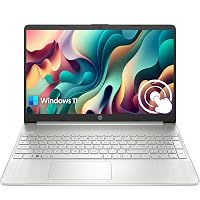
The silver chassis of this 15.6-inch notebook delivers a standard clamshell form factor focused on everyday business functionality and expanded internal storage. The system comes equipped with essential physical connectivity ports, integrated communications hardware, and a pre-installed operating system right out of the box.
In the box
- Intel Core i3-1115G4 dual-core processor with clock speeds up to 4.1 GHz via Intel Turbo Boost Technology and a 6 MB L3 cache
- Upgraded 16GB high-bandwidth RAM designed for smooth multi-application multitasking
- Upgraded 1TB PCIe NVMe Solid State Drive for swift system boot times and generous local file capacity
- 15.6-inch diagonal HD (1366 x 768) micro-edge BrightView touchscreen display with 220 nits brightness and 45% NTSC color coverage
- Integrated Intel UHD Graphics with 1GB allocated graphics memory
- One SuperSpeed USB Type-C port supporting a 5Gbps signaling rate
- Two SuperSpeed USB Type-A ports supporting a 5Gbps signaling rate
- One HDMI 1.4b video port for connecting external monitors or conference displays
- One headphone and microphone combo audio jack
- One AC smart pin connector for wall power
- Front-facing webcam with automatic backup software integration
- Windows 11 Home operating system pre-installed
Key Specifications
| Processor | Intel Core i3-1115G4 (Up to 4.1 GHz, 2 Cores, 4 Threads, 6 MB L3 Cache) |
|---|---|
| System Memory | 16 GB High-Bandwidth RAM |
| Storage Drive | 1 TB PCIe NVMe Solid State Drive |
| Display Panel | 15.6" HD (1366 x 768) Touchscreen, BrightView, 220 nits, 45% NTSC |
| Graphics Hardware | Integrated Intel UHD Graphics (1 GB Video RAM) |
| Operating System | Windows 11 Home |
| Port Selection | 1 USB-C (5Gbps), 2 USB-A (5Gbps), 1 HDMI 1.4b, 1 Audio Combo, 1 AC Smart Pin |
| Power and Voltage | 7.4 Volts, Up to 11 Hours Battery Life |
| Form Factor and Weight | Standard Laptop, Silver, 1.7 kg |
Figures as published by the manufacturer on the Amazon listing.
Everyday Office Performance and Multitasking Capabilities
The everyday hp pavilion 15 performance reflects an interesting contrast between entry-level processing hardware and upgraded memory capacity. At the center of the motherboard, the Intel Core i3-1115G4 processor operates with two physical computing cores and four threads. When demanding single-threaded tasks arise, Intel Turbo Boost Technology pushes clock speeds up to 4.1 GHz. In standard business routines, such as managing email inboxes, writing client proposals, entering accounting entries, and maintaining web-based customer portals, the processor executes instructions quickly. Because standard office workflows rely primarily on short bursts of single-core performance, everyday navigation feels remarkably fluid.
The primary performance asset of this configuration is the upgraded hp pavilion 15 16gb ram 1tb ssd arrangement. Standard enterprise laptops in this class frequently come equipped with only 8GB of memory, which quickly fills up when several modern browser windows and workplace communication utilities run simultaneously. With 16GB of high-bandwidth memory on hand, the system keeps active processes in fast RAM rather than swapping data out to slower virtual cache memory. Furthermore, the 1TB PCIe NVMe solid-state drive ensures that the Windows 11 Home operating system boots in seconds, while local spreadsheets and large business records open without noticeable delays.
Nevertheless, buyers who require sustained processing throughput must keep the dual-core architecture in mind. If your daily work entails compiling heavy code, rendering long video sequences, or running multiple virtual developer environments, two computing cores will reach maximum utilization quickly. For sustained multi-threaded computing, a machine like the hp – 15.6 full hd laptop – amd ryzen 7 – 16gb memory – 1tb ssd – natural silver offers higher core counts for compute-heavy multitasking. For general administrative tasks, however, the hp pavilion 15 i3-1115g4 delivers a dependable foundation that avoids performance bottlenecks during routine hp pavilion 15 for office work.
Display Clarity and Touchscreen Utility
Conducting an objective hp pavilion 15 touchscreen review requires examining how this screen configuration balances user interaction against raw display resolution. The 15.6-inch diagonal display utilizes a micro-edge BrightView panel running at an HD resolution of 1366 x 768 pixels. The thin side bezels give the notebook an open, contemporary profile, but the 768p resolution provides a lower pixel density across a 15.6-inch viewing area than a 1080p panel would. Standard text, web pages, and productivity dashboards remain fully legible, but users who prefer ultra-sharp typography or frequently place two large documents side by side will notice the modest resolution limits.
The primary advantage of this display assembly is its integrated touch capability. Having a responsive touchscreen interface allows you to scroll through lengthy PDF contracts, tap on interface buttons, check off inventory boxes, and zoom in on graphics without relying entirely on the trackpad or an external mouse. In client-facing settings, front-counter reception stations, or casual office check-ins, the ability to tap and sign directly on the screen provides practical convenience that speeds up routine administrative interactions.
Regarding color reproduction and panel illumination, the screen provides 220 nits of peak brightness and covers 45% of the NTSC color gamut. This level of brightness is appropriate for standard indoor office lighting, home workspaces, and conference rooms. However, 220 nits is not built for bright outdoor environments or direct sunlight, where reflections on the glossy BrightView surface can reduce visibility. Professionals who demand higher color fidelity, outdoor viewing power, or full convertible flexibility may prefer premium alternatives like the hp envy x360 15, which focuses on upgraded display engineering.
Portability, Battery Life, and Connectivity
For professionals who routinely transport their workstation between office cubicles, client locations, and home desks, this machine offers practical portability. With an overall weight of 1.7 kg, the laptop is notably easy to handle for a 15.6-inch system. The silver chassis maintains a standard laptop form factor that slips easily into ordinary messenger bags and commuter backpacks, making it a viable travel companion for hybrid workers who commute regularly.
The physical hardware is supported by dependable battery efficiency, with the listing citing up to 11 hours of battery life operating on a 7.4-volt power platform. Because the dual-core processor operates with an efficient thermal profile and the HD display draws less power than higher-resolution screens, the laptop conserves energy effectively during standard administrative work. In everyday usage involving word processing, web navigation, and email communication, this power profile helps users complete extended work sessions away from wall outlets.
Physical peripheral support is another strong point of this chassis, offering a versatile range of connection options without forcing you to carry separate dongles. You get one SuperSpeed USB Type-C port and two SuperSpeed USB Type-A ports, all supporting a 5Gbps signaling rate for quick flash drive and accessory transfers. A full-sized HDMI 1.4b output enables seamless connections to meeting room projectors and external monitors, while a combination audio jack supports wired headsets. Mobile professionals who prioritize ultralight hybrid designs with cutting-edge mobile silicon can evaluate alternatives like the hp – omnibook x flip 2-in-1 – 14 2k touchscreen laptop – intel core ultra 5 226v ’24 – 16gb memory – for comparison.
Professional Use Cases and Workflow Suitability
Assessing the computer for dedicated hp pavilion 15 professional use requires matching its technical strengths with appropriate organizational tasks. The standout hardware asset in this build is the large 1TB PCIe NVMe solid-state drive. For professionals who manage extensive local archives of PDF invoices, client contracts, database exports, and high-resolution marketing assets, having an internal terabyte of fast storage provides great peace of mind. You can store your essential records locally on the drive without constantly depending on external flash drives or stable internet connections for cloud access.
Thanks to the combined 16GB memory footprint and fast NVMe storage, this laptop serves as an effective workstation for executive assistants, administrative coordinators, paralegals, medical front-desk staff, and customer service teams. These roles typically involve managing several enterprise web portals, database programs, email clients, and communication apps simultaneously. The hardware handles these parallel tasks without stalling, ensuring that standard customer-facing and record-keeping operations proceed efficiently.
On the other hand, the hardware configuration is not intended for specialized creative or scientific workloads. The integrated Intel UHD Graphics processor with 1GB allocated memory provides smooth video playback, clean multi-display output, and responsive document navigation, but lacks the dedicated rendering power required for 3D modeling, advanced CAD drafting, or commercial video production suites. Reviewing these published hp pavilion 15 specs allows businesses to assign this computer to the office tasks where it performs best.
HP Pavilion 15 Pros and Cons
Pros
- Upgraded 16GB high-bandwidth RAM
- Spacious 1TB PCIe NVMe SSD
- Responsive 15.6-inch touchscreen display
- Lightweight 1.7 kg chassis
- Versatile USB-C and HDMI connectivity
Cons
- Dual-core Intel Core i3-1115G4 processor
- 1366 x 768 HD screen resolution
- Modest 220 nits peak brightness
Check HP Pavilion 15 on Amazon
Is the HP Pavilion 15 Worth It
Determining whether the question of is hp pavilion 15 worth it results in a clear yes depends entirely on what you prioritize in your day-to-day office workflow. If your primary frustration with previous computers has been slow startup speeds, application stuttering when opening numerous browser tabs, or running out of local drive space, this upgraded model directly addresses those concerns. The presence of 16GB RAM alongside a 1TB PCIe NVMe SSD provides an expansive operational cushion that makes routine office work feel fast and dependable.
Conversely, if your daily work demands fine-detail graphic design, advanced photo editing, or managing complex split-screen data sets that require a 1080p or 2K panel, the 1366 x 768 resolution will feel limiting. In the same manner, users who run heavy computational tasks or large-scale compilation jobs will find the dual-core Intel Core i3-1115G4 processor slower than modern quad-core or octa-core alternatives. For the vast majority of general business users, administrative staff, and home office workers who need responsive multitasking, massive local storage, and touchscreen utility, this configuration delivers solid everyday value.
Other Options to Consider
| Model | Our score | Why it is here |
|---|---|---|
 HPHP Pavilion 15.6" HD Touchscreen Anti-Glare Laptop, 16GB RAM, 1TB SSD Storage,…Reviewed here HPHP Pavilion 15.6" HD Touchscreen Anti-Glare Laptop, 16GB RAM, 1TB SSD Storage,…Reviewed here |
8.2/10Good | The model reviewed on this page. View listing |
 HPHP 14 Laptop, 2027 Edition, 4GB RAM, 128GB SSD, Intel N150 CPU HPHP 14 Laptop, 2027 Edition, 4GB RAM, 128GB SSD, Intel N150 CPU |
5.0/10Poor | 2026-2027 edition suits professionals who prefer a more compact 14-inch form factor and rely heavily on cloud infrastructure, pairing an Intel N150 processor, 4GB DDR5 RAM, 128GB SSD, Windows 11 with Microsoft 365, and 1 TB cloud storage for users who prioritize bundled office software over large local hardware drives. View listing |
 Padix15.6 Inch Laptop Computer, N4020, 4GB DDR4 RAM, 128GB eMMC,with Windows 11 Padix15.6 Inch Laptop Computer, N4020, 4GB DDR4 RAM, 128GB eMMC,with Windows 11 |
8.2/10Good | Supports 1TB TF Card Expansion appeals to students and budget-conscious office workers who require a 15.6-inch notebook with a sharper FHD LCD display, featuring an Intel N4020 processor, 4GB DDR4 RAM, 128GB eMMC storage, Windows 11, and portable notebook convenience backed by expandable memory card storage. View listing |
 HPHP 2026 Essential Laptop, Intel Processor, 128GB Storage, Windows 11 HPHP 2026 Essential Laptop, Intel Processor, 128GB Storage, Windows 11 |
8.6/10Good | Copilot AI serves mobile users looking for an ultra-portable Natural Silver HP laptop that emphasizes artificial intelligence workflows, featuring dedicated Copilot AI integration, an Intel processor, 128GB storage, an LED display, Windows 11, Office 365, and 1TB cloud storage for modern online administrative tasks. View listing |
Scores are out of 10, based on listed specifications and buyer feedback. Prices are the ones on the listing when this page was written.
FAQ
Does the HP Pavilion 15 have a touchscreen display?
Yes, this HP Pavilion 15 configuration features a 15.6-inch diagonal HD (1366 x 768) micro-edge BrightView touchscreen display with 220 nits brightness and 45% NTSC color coverage, supporting direct tap, swipe, and scroll navigation on the panel.
What processor is included in this HP Pavilion 15 configuration?
The laptop is powered by an Intel Core i3-1115G4 dual-core processor that includes 4 threads, a 6 MB L3 cache, and maximum clock speeds reaching up to 4.1 GHz with Intel Turbo Boost Technology for responsive single-threaded performance.
How much RAM and storage capacity does the system have?
This upgraded model comes equipped with 16GB of high-bandwidth RAM to support multi-application multitasking, alongside an upgraded 1TB PCIe NVMe Solid State Drive for rapid system booting and extensive local file storage.
What ports and connection options are available on this laptop?
The laptop chassis includes one SuperSpeed USB Type-C port (5Gbps signaling rate), two SuperSpeed USB Type-A ports (5Gbps signaling rate), one HDMI 1.4b video port, one headphone/microphone combination audio jack, and an AC smart pin power connector.
Can the HP Pavilion 15 handle heavy video editing or 3D design software?
The system utilizes integrated Intel UHD Graphics with 1GB allocated memory and a dual-core Intel Core i3 processor, making it best suited for general office productivity, web administration, and document management rather than intensive 3D modeling or 4K video editing.
More Computers & Laptops ratings
See the section
Apple 14-Inch MacBook Pro M5 Pro Review: Built for Heavy Multitasking
Selecting a capable mobile workstation requires balancing computational throughput against memory overhead and thermal efficiency. For professionals who push beyond simple document creation into…

Apple MacBook Pro M4 Review: Is the 24GB RAM and 1TB Spec Worth It?
Selecting the right hardware configuration often marks the difference between smooth daily operations and continuous computing bottlenecks. The Apple MacBook Pro M4 equipped with…

STGAubron Gaming Desktop: Practical Verdict for Busy Users
Shoppers researching the volt elite 3.0 gaming pc frequently look for an accessible desktop capable of serving double duty as a reliable home workstation…

Apple MacBook Pro 16-Inch Review: A Decisive Workstation Analysis
Investing in the Apple MacBook Pro 16-Inch equipped with the Apple M5 Max chip, 18-core CPU, 40-core GPU, and 128GB of unified memory is…

Apple MacBook Air M5 (24GB): Is the Extra RAM Worth It for Pros?
Selecting the right laptop configuration often comes down to balancing system longevity against daily workflow requirements. The Apple MacBook Air M5 equipped with 24GB…
Get new ratings by email
A weekly digest of the products added to the ratings pages.